Draft (unpublished)
Why Notion Goal Tracking Stalls
Why Notion goal tracking templates stall, with a Notion-to-Abstria concept map, an export walkthrough, and how to split work between the two tools.
- migration
- Notion
- goal tracking
You open Notion every day, but the goals page you built in January has not been touched in weeks. That gap is not a flaw in Notion and it is not a willpower problem. It comes from a mismatch: Notion's "build anything" flexibility versus the fixed structure that goal tracking actually needs.
What Notion is not built to do
Notion lets you keep goals, tasks, journals, and reviews in one workspace, shaped however you like, and view the same data as a table, board, or calendar. It is especially good as a place to write down the reasoning behind a goal, and personal use has no block limit even on the Free plan (source: Notion pricing, as of September 2026).
The catch is that Notion has no concept of a "goal." It has pages, databases, and properties. The distinction between "this year's goal," "this month's milestone," "this week's plan," and "today's task" only exists once you design it yourself.
That is the correct design philosophy for Notion. It refuses to impose a use case, and being able to model anything is the whole point. But recreating a goal system inside it means wiring together at least three or four databases with relations, computing progress with rollups, and generating weekly and monthly pages from template buttons. Plenty of people can build that. It is simply too much work to do before you start making progress on the goal itself.
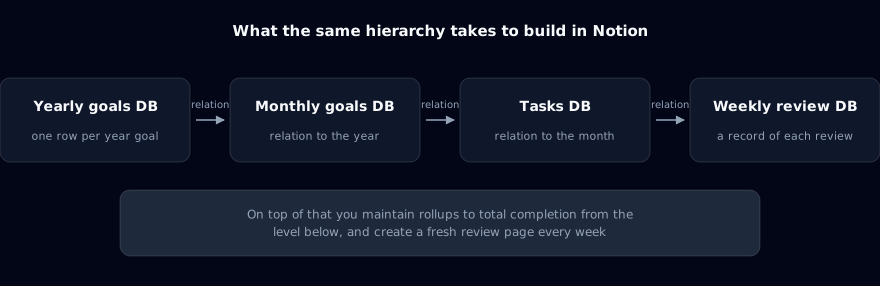
Three reasons Notion goal templates go stale
Whether you install an official template or a community one, the templates that stop getting updated after a few weeks tend to fail in the same three places.
Today's task never connects to the goal
Most goal templates keep yearly goals in one database and daily tasks or habits in another. Even when a relation property links them, you decide which goal a task belongs to every single time you add one.
Add that small step to every task capture and the busiest days are the ones where you skip it. Unlinked tasks pile up, the rollup on the goal side drifts away from reality, and a goal page with inaccurate progress becomes a page nobody opens.
Finishing work does not move the level above it
Notion rollups can show the completion rate of child tasks. But that number is only an aggregate. Deciding that "this month's goal is done" or "this part of the yearly goal is done" and writing it into the goal's status is a separate action: either you flip it by hand, or you build it with database automations on a paid plan (triggers on property changes that then edit pages or properties in another database). Automations are possible, but the triggers listed in Notion's help center are name, person, number, text, select, and relation properties. Changes to rollups or formulas are not on that list. You end up designing and maintaining your own chain that fires from a child task's status change and updates the parent (source: Notion Help: Database automations, as of September 2026).
The result is familiar: your daily tasks are all checked off, while the monthly and yearly goals still show the status you set in January. Completing one task today produces no visible movement toward the yearly goal, so "getting things done" and "making progress" stop feeling like the same thing.
Nothing forces a weekly or monthly reset
The part of goal tracking that matters most is what you do with the work that did not get done this week or this month. Do you re-commit to it, split it, or drop it? Without a moment that forces that decision at the week and month boundary, unfinished tasks just accumulate.
To recreate that in Notion, you create a weekly review page every week, filter for incomplete tasks, and follow your own rule for redistributing them into next week. You can write that rule down, but nothing in the tool enforces it, so the first busy week you skip it, the system quietly breaks. The routine itself is covered in how to run a weekly review in 15 minutes; knowing the steps is not the hard part, and having a place in the tool that asks for them every week is.
Hand the hierarchy to a tool where it is fixed
The fix is not to abandon Notion. It is to move one specific part out: the year, month, week, and day hierarchy, into a tool that ships with that structure already built.
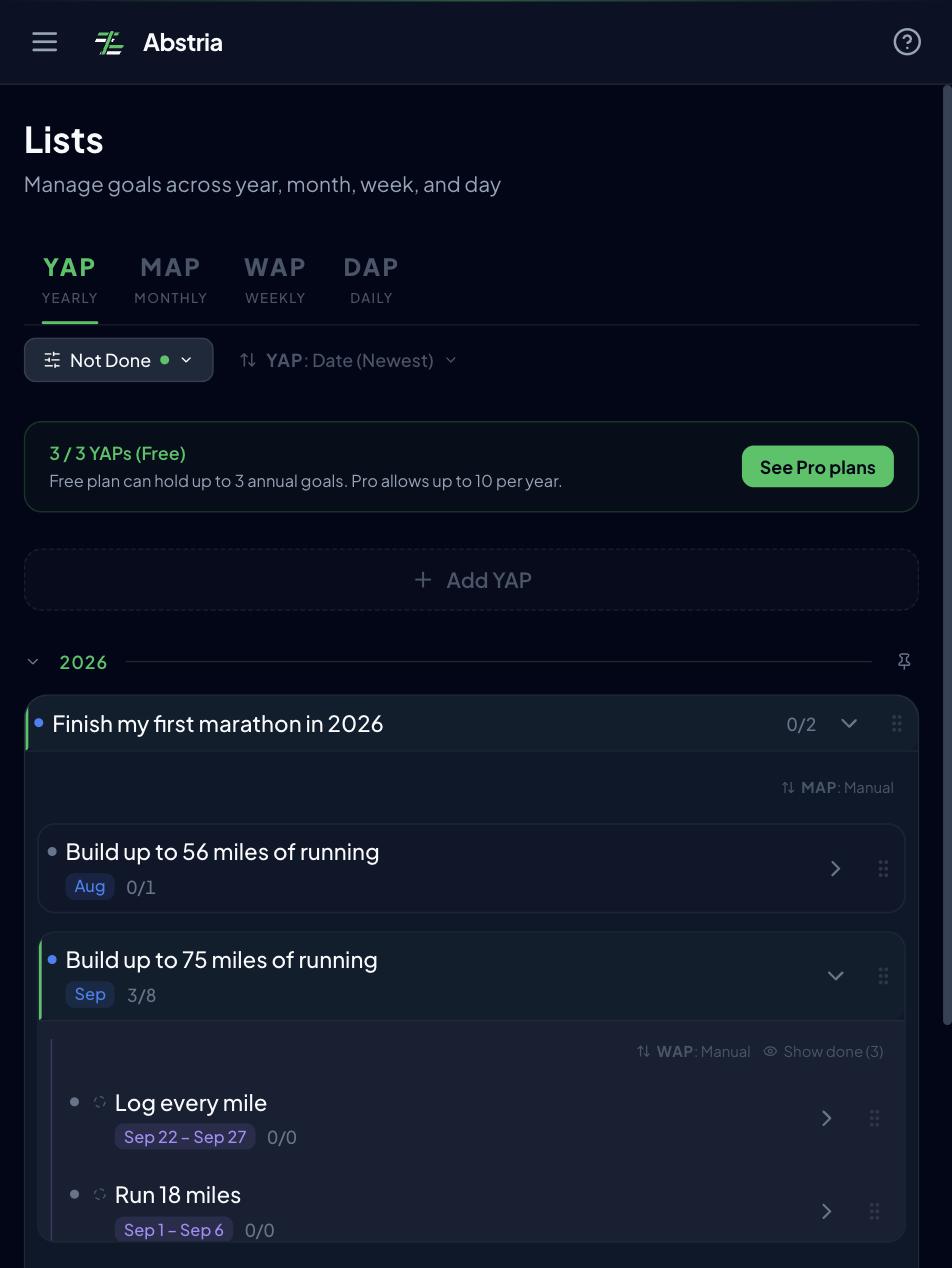
Abstria is a web app built around exactly that fixed hierarchy. The structure is decided in advance; the only thing you decide is what goes inside it.
- YAP (Year Action Plan): what you will achieve this year. Up to 3 on the Free plan
- MAP (Month Action Plan): this year's goal broken into monthly milestones
- WAP (Week Action Plan): the weekly goals that carry a milestone forward. Up to 8 per MAP, across the whole month
- DAP (Daily Action Plan): today's tasks, chosen from this week's plan
Here is how each failure mode above disappears:
| What happens in Notion | How Abstria handles it |
|---|---|
| You pick the task-to-goal link by hand every time | A DAP can only be created under a WAP, so an unlinked task is not a state you can reach |
| Completion never moves the monthly or yearly status | Completing today's action rolls up automatically: once every child is done, the week, month, and year follow |
| Nothing catches unfinished work at the week/month line | The Review screen offers to carry actions that were not finished before this month into this month's WAPs (the screen says "last month's leftovers," but everything prior to this month is included) |
For a side-by-side look at Abstria next to other tools, see our comparison of goal setting apps. What you give up with a fixed structure is real: it means no long-form rationale attached to a goal and no custom properties of your own. That is exactly why the proposal in this article is a split, not a replacement. Keep the writing in Notion; move only the hierarchy (more on the division of labor below).
You can see how it behaves without signing up. In the demo, one click on the complete button is enough to watch a finished daily action propagate up through the week, month, and year.
Notion concepts mapped to Abstria
Here is what your existing Notion structure corresponds to. Notion setups vary by template, so this assumes the arrangement most goal templates use.
| Notion concept | Abstria concept | Notes |
|---|---|---|
| A row in your "Yearly goals" database (or a goal page) | YAP | One per year, up to 3 on Free. Keep the rationale in Abstria's description field or in Notion |
| A row in "Monthly goals," or a per-month page | MAP | Sits under a YAP, one per month. Replaces the "this month" section you built by hand |
| A task row that means "this week" | WAP | Up to 8 per MAP for the whole month, so roughly one or two per week |
| A task row that means "today" / a to-do | DAP | Sits under a WAP. The closest thing to a Notion checkbox or to-do block |
| Status property (Not started / In progress / Done) | Status | Abstria uses the same three values. Done propagates upward automatically |
| Relation (task to goal) | The hierarchy itself | No manual linking step at all |
| Rollup (completion rate of child tasks) | Built-in aggregation | Nothing to configure |
| Weekly review page and template button | Review screen | Carries unfinished actions from before this month into this month's WAPs |
| Board view grouped by status | Today screen | Today's actions on a Not started / In progress / Done kanban |
| Quick notes and errands with no goal attached | Inbox | A holding place for tasks outside the hierarchy |
| Rationale, decision logs, long-form reflection | (no equivalent) | Stays in Notion. Abstria is scoped to running the hierarchy and has no long-form notes |
That last row is the point: you are not supposed to move everything. Only the hierarchy and its statuses belong in Abstria. Everything else works better where it already is.
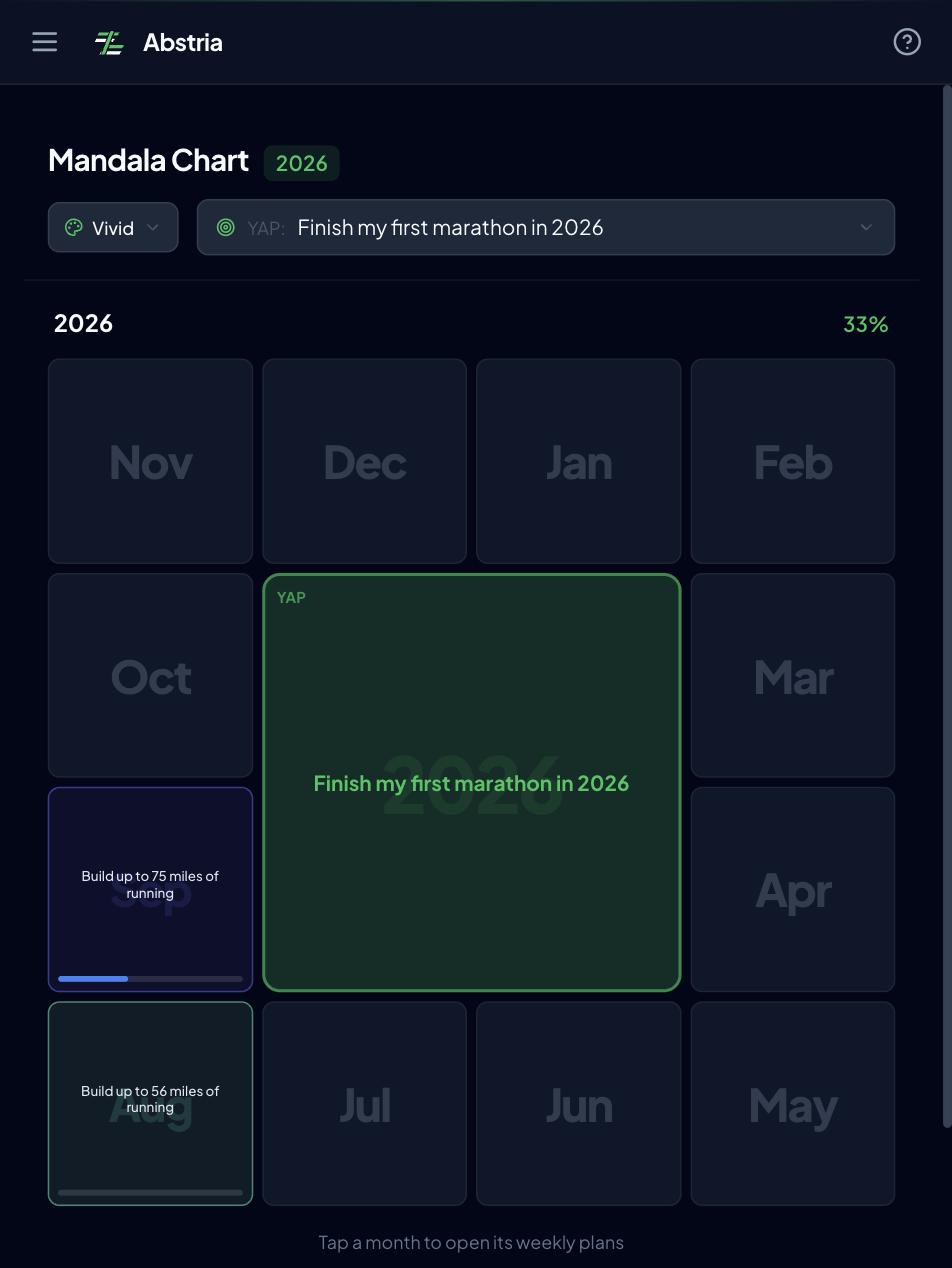
Abstria also has a Mandala screen: a 3x3 grid with a MAP at the center and its 8 WAPs around it. If you kept a bulleted "things to do this month" list under each monthly goal in Notion, that view replaces it. The thinking behind the grid is explained in how to make a mandala chart.
How to move your goals out of Notion
Abstria has no bulk importer that reads a Notion export file (as of September 2026). There is no import UI in settings either. The baseline migration is manual: export from Notion to keep a copy, then rebuild this month only in Abstria using the concept map above.
Resist the urge to bring everything across. Importing every stalled goal reproduces the stalled state. A migration is also a chance to cut the list down to what you will actually work on.
Step 1: Export your Notion data as a backup
From the "•••" menu at the top right of a page or database, choose "Export" and pick "Markdown & CSV." Pages come out as Markdown and databases as CSV. To take the whole workspace, go to Settings, then Workspace, then General, and choose to export all workspace content (source: Notion Help: Export your content, as of September 2026).
If you only care about the goal system, export just those pages: the yearly goals, monthly goals, and task databases. Leave the Notion pages themselves in place for now.
Step 2: Cut this year down to one to three YAPs
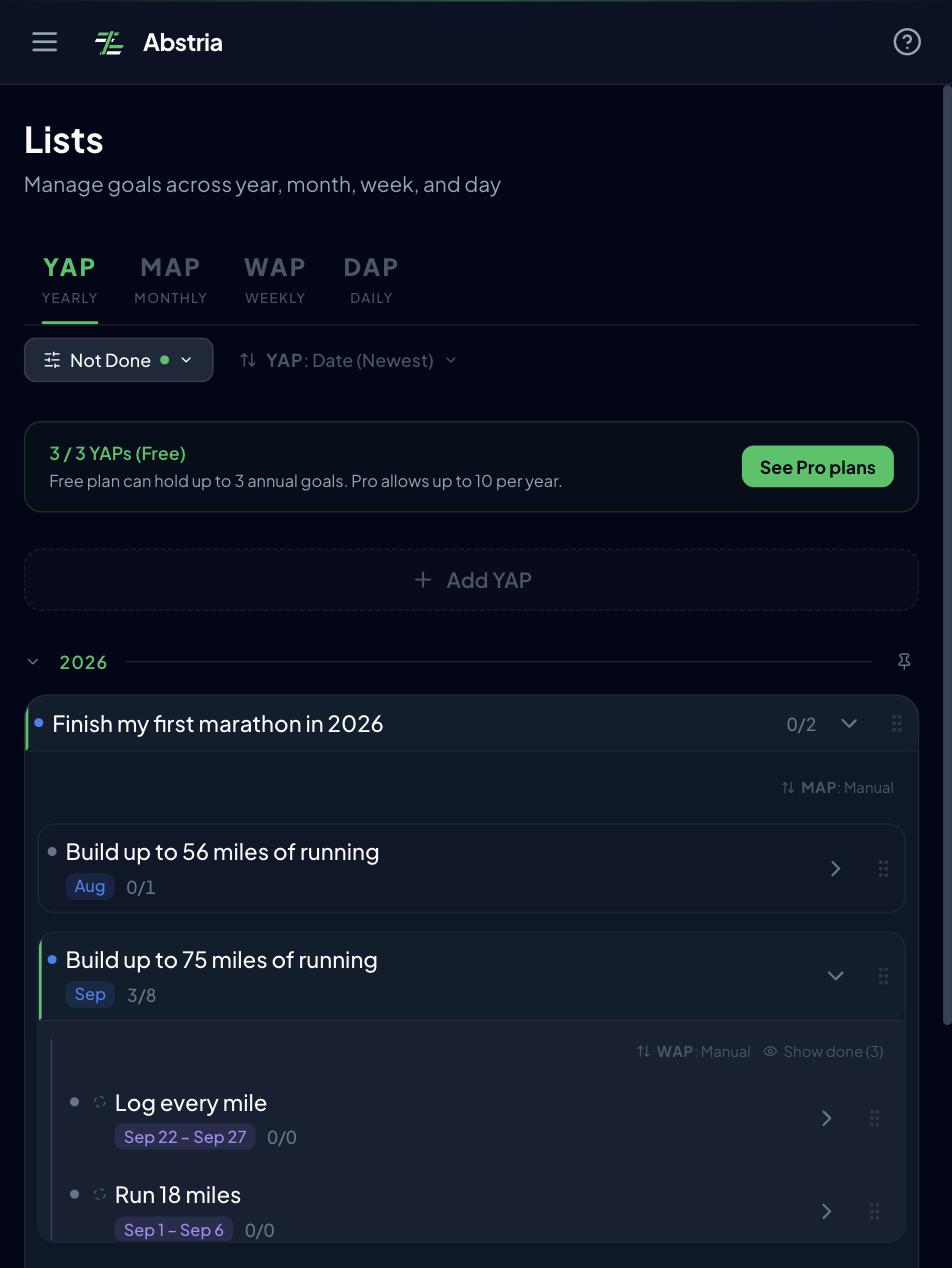
Look at your exported list of yearly goals and pick the one to three you will genuinely move forward in the time left this year. The Free plan caps YAPs at 3, which lines up with that number. If ten goals are sitting in Notion, this is the moment to decide that seven of them are either "next year" or "dropped."
Create the survivors as YAPs from Abstria's Lists screen. Write each title as a single sentence you can judge yes or no at year end. If the wording is not coming easily, the steps in how to set annual goals apply here as well.
Step 3: Build this month's MAP and this week's WAPs, nothing more
Create one MAP under the YAP for the current month. Do not create past months or future ones yet. The goal of the first pass is the smallest setup you can run starting this week.
Then pull the rows from your Notion task database that belong to this week and create them as WAPs under the MAP, up to 8 for the month. Anything that does not fit goes to a later week or into the Inbox.
Step 4: Pick one to three DAPs and start running the system
Finally, choose one to three actions from your WAPs to run today as DAPs. At that point your day works without opening the Notion goals page at all, and the migration stops here. Bring historical logs over only after one or two weeks, once you have decided the tool is sticking.
Bulk loading via the API (if you write scripts)
If you would rather transform your Notion CSV and load it in one shot, Abstria's API has POST /api/v1/imports, which accepts YAPs, MAPs, WAPs, and DAPs as one nested JSON tree in a single request. It does not accept CSV, so you will need your own script to convert the Notion export into that tree.
{
  "yaps": [
    {
      "title": "Finish my first marathon in 2026",
      "start_date": "2026-01-01",
      "maps": [
        {
          "title": "September: 120 km total",
          "start_date": "2026-09-01",
          "end_date": "2026-09-30",
          "waps": [
            {
              "title": "Long run: 20 km",
              "start_date": "2026-09-14",
              "end_date": "2026-09-20",
              "daps": [{ "title": "30-minute morning jog", "scheduled_date": "2026-09-14" }]
            }
          ]
        }
      ]
    }
  ]
}
External scripts authenticate with an API key (Authorization: Bearer abs_live_...). Keys are issued from the "API" section of settings and are Pro only (a browser fetch from a logged-in session can use the same endpoint with the session cookie). Per request the limits are 10 YAPs, 12 MAPs per YAP, and 8 WAPs per MAP, on top of your plan's own caps (Free allows 3 YAPs). Field details and samples live in the API reference.
Even with a script, do step 2 by hand. Pruning is the part that should not be automated.
What the first week after the move looks like
Starting the week after migration, the rhythm is:
- Monday: open Lists, review this week's WAPs, and pick your first DAP. If the Review screen carried something over, make that the first one
- Tuesday through Friday: work from the Today screen, moving DAPs across the Not started / In progress / Done kanban. When every child action is done, the WAP, MAP, and YAP statuses update on their own. Anything unfinished simply stays for tomorrow
- Sunday: look at the WAPs you did not finish and decide: re-commit, split, or drop. Then set up next week's WAPs within the 8-per-month budget, following the routine in how to run a weekly review in 15 minutes
- End of the month: in the Review screen, decide which unfinished actions from before this month to carry into this month's WAPs, and create next month's MAP
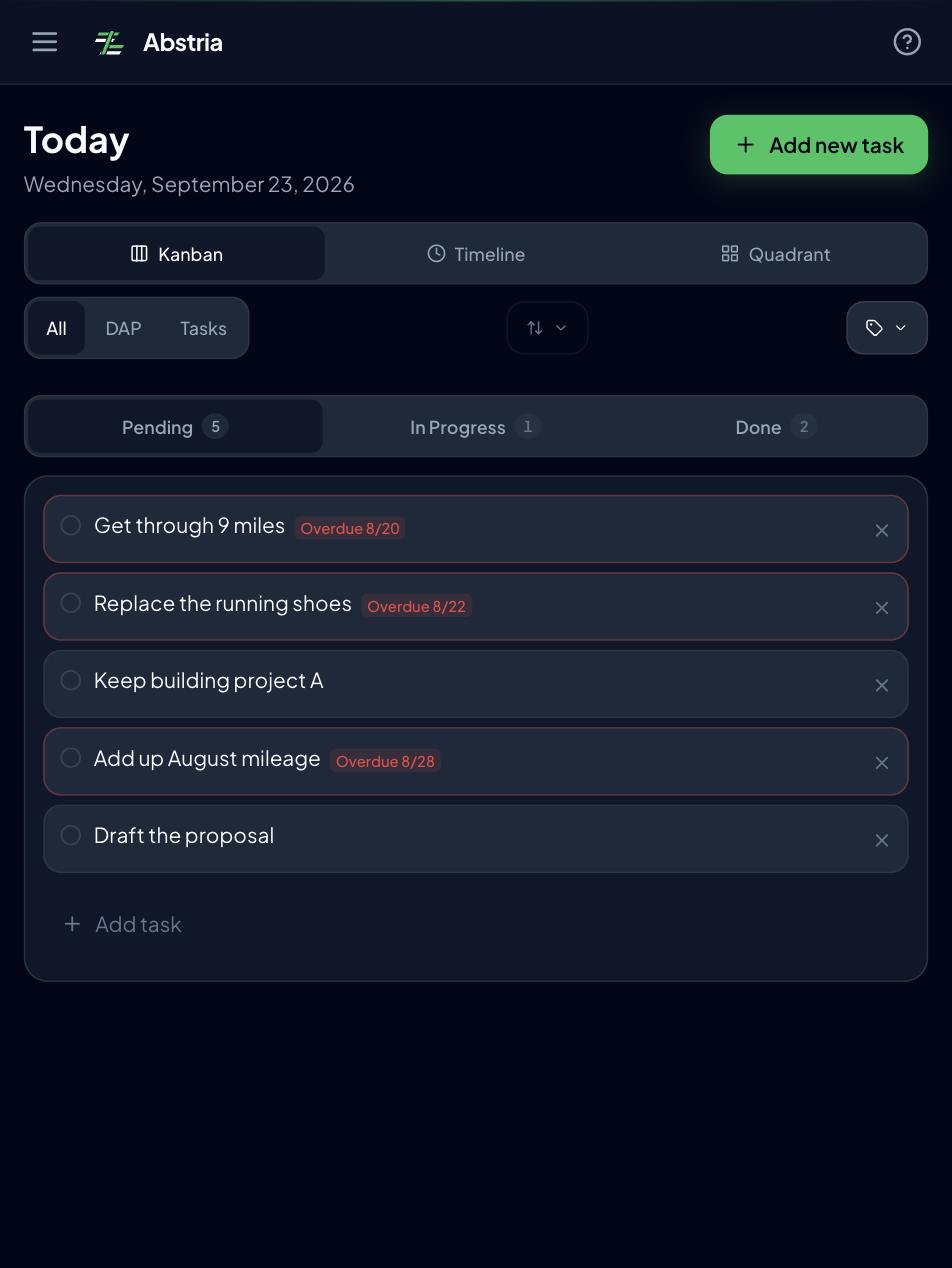
The difference from Notion is what is missing from that list: no tidying databases and relations, no template button to generate this week's page. Across a full week you touch three screens: Lists, Today, and Review.
Splitting work between Notion and Abstria
Because only the hierarchy and its statuses move, Notion stays in the picture. A reasonable division:
| Job | Where | Why |
|---|---|---|
| Year / month / week / day hierarchy and status | Abstria | Fixed structure, completion rolls upward, no maintenance work |
| Executing today's tasks on a kanban | Abstria | Marking done on the Today screen moves the goal itself |
| Rationale, reasoning, reference links | Notion | Long-form writing and link libraries are what Notion is good at |
| Written weekly and monthly reflection | Notion | Abstria's Review is scoped to carry-over decisions, not prose |
| Anything unrelated to your goals | Notion | It should not be in a goal tracker in the first place |
Drop a single link to the matching Abstria screen on your Notion goal page. After re-reading the reasoning, you are one click from the hierarchy, and the two tools stop feeling disconnected. The reverse works too: paste the Notion page URL into an Abstria item's description.
Note that there is no automatic sync between Notion and Abstria as of September 2026.
If your tasks live in Todoist rather than Notion, the same reasoning is worked through in the Todoist goal tracking guide. If you use both, a three-way split also works: Notion for context and records, Todoist for errands, Abstria for the goal hierarchy.
FAQ
Q. Can I keep using Notion alongside Abstria?
Yes, and that is the recommended setup. Only the year/month/week/day hierarchy and its statuses move to Abstria; rationale, long notes, and reference material stay in Notion. There is no automatic sync between the two, so put a link to Abstria on your Notion goal page to make the round trip easy.
Q. Can I import my Notion data directly?
No. There is no feature that reads a Notion export file as of September 2026. The standard path is to export from Notion as Markdown & CSV for safekeeping, then rebuild this month only by hand in Abstria. If you write scripts, you can bulk load a nested JSON tree through POST /api/v1/imports (API keys are Pro only; see the API reference).
Q. Can I get my data back out if I change my mind?
Yes. Abstria exports everything as JSON or CSV at any time, from the "Data export" section of settings or via GET /api/v1/export. JSON is a single complete backup; CSV is a ZIP of per-table files. Both include the full YAP / MAP / WAP / task hierarchy and its links, and the CSV can be imported back into a Notion database.
Q. Is there a Notion integration?
No, there is no direct Notion integration at this time (as of September 2026). The migration in this article works through export plus manual rebuilding, or a bulk load through the API.
<!-- TODO(decision): Notion 連携の「今後の予定」を記事に書くかを決める(ja.md の同じ FAQ と対で扱う)。 書く場合: 直前の A の末尾に 1 文追加する。「ロードマップ上の予定であり時期は変わりうる(planned, timing may change)」と必ず添える。ja.md の同じ FAQ にも同内容を入れる。 書かない場合: この TODO を削除するだけでよい。本文の "there is no direct Notion integration at this time" は事実として正しいので、他に直す箇所は無い。 調査済み(2026-09-23): リポジトリの実装に Notion 連携は存在しない。apps/web 配下の grep で該当するのは features/lists/components/DescriptionViewerContent.tsx の CSS クラス名 `.notion-viewer` と lib/i18n/index.ts の LP FAQ 文言のみで、Settings にも Notion の Integrations 項目は無い。 docs/22 §5 および docs/03_business-roadmap.md(262 行目「2026-09 Notion 連携(読込)」・530 行目)は 2026-09 を Notion 連携の月としているが、これは社内の計画であって実装の根拠ではない。これらを根拠に「リリース済み」と書いてはいけない。 -->Q. How far does the free plan go?
The Free plan gives you 3 YAPs and up to 100 active items, with full access to the Mandala view and the year/month/week/day hierarchy. Pro ($9/month, as of September 2026) raises that to 10 YAPs per year and 1,000 active items, and unlocks API keys. See the pricing page for details.
Start with this month only
The migration proposed here is narrow on purpose: let Abstria own the year, month, week, and day hierarchy, and leave the reasoning and long-form writing in Notion.
Start with the demo, no account needed, and watch what happens to the week, month, and year when you mark one action complete.
See Abstria in action (no signup)
If it clicks, the Free plan is enough to build this month's YAP, MAP, and WAPs. Abstria is invite-only as of September 2026, and we are onboarding people in the order they request access.
Already have an invite code? Go straight to creating an account.
<!-- TODO(release): 招待制が解除されたら、記事末の CTA を差し替える(ja.md 末尾と対で扱う)。 やること: (1) 主 CTA を [Request access](/invite) から /signup(Get started free)に戻す (2) "Abstria is invite-only as of September 2026, and we are onboarding people in the order they request access." の 1 文を削除する (3) "Already have an invite code? Go straight to [creating an account](/signup)." の 1 文を削除する (4) ja.md 末尾の対応する 3 箇所も同時に直す。 発火条件: apps/web/middleware.ts の /signup に対する referral_pending Cookie ゲート(93〜96 行目付近)が撤去されること。 調査済み(2026-09-23): ゲートは有効。未認証かつ referral_pending Cookie 未取得で /signup にアクセスすると /invite へリダイレクトされるため、現状の CTA は正しい。 -->