Draft (unpublished)
Todoist Goal Tracking Migration
Todoist goal tracking stalls while tasks get done. Here is why goals stall, plus how to move your goal hierarchy into Abstria without giving up Todoist.
- Migration
- Todoist
- Goal management
You clear your Todoist list every day, your Karma keeps climbing, and yet the goal you set in January hasn't visibly moved. This article is for Todoist users in exactly that spot. The cause isn't a flaw in Todoist, and it isn't your discipline. It's that task management and goal management are two different jobs, and Todoist is optimized for the first one.
What Todoist is genuinely good at
Start with the strengths, because the weaknesses are the flip side of them.
- Speed of capture. Type "every Monday 9am" or "tomorrow p1" in plain language and you get a task with a due date, a recurrence rule, and a priority. The single most important thing in task management — capturing an idea the moment it occurs to you — takes seconds.
- Recurrence and due dates. Daily, every third day, last day of the month: the recurrence grammar is rich, and anything overdue collects in the Today view. As a system for not dropping routines, it's about as good as it gets.
- A reason to keep going. Completing tasks earns Karma points, and you can set daily and weekly completion targets in the Productivity section of settings (source: Todoist Help, "Introduction to Karma", as of September 2026).
Why goal tracking in Todoist breaks down
If you want to manage goals in Todoist, the natural move is one project per goal. That approach runs into three structural limits.
A task doesn't carry what it's for
A Todoist task belongs to a project, but the project itself doesn't say whether it's a yearly goal, a monthly milestone, or just a bucket. If a project called "Spanish" holds "20 pages of vocab," "tutoring session," and "book the DELE exam," nothing in those tasks tells you which stage of "reach B2 by December" they belong to.
Every completion raises your Karma, but Karma counts tasks finished, not distance closed on a goal.
There's no place to hold a year, month, and week
Todoist's hierarchy is projects, sub-projects, sections, tasks, and sub-tasks. To express "yearly goal, monthly milestone, this week's plan, today's task," you have to invent a convention — goal as project, month as section, week as parent task, day as sub-task — and then keep it intact yourself.
Todoist doesn't enforce that convention. A few busy weeks of "just drop it in Inbox" and "add it straight under the project," and the layers stop meaning anything. What's left is a list that no longer tells you how anything relates to a goal, so you fall back to living in the Today view. Tasks keep flowing, which is exactly why the collapse is easy to miss.
There's no unit for picking up an unfinished week or month
The highest-leverage move in goal management happens at a week or month boundary: looking at what didn't get done and deciding to re-enter it, split it, or drop it. In Todoist, overdue tasks gather under Overdue in the Today view and you reschedule them forward.
As day-level recovery, that works well. But there's no screen that asks, "of this month's goals, which ones didn't land?" Push overdue items forward one at a time and only the dates move; the thinking never happens. The result is a handful of goal-shaped tasks that live permanently in Overdue.
Task management vs. goal management
| Dimension | Task management (Todoist's strength) | Goal management (what this guide moves) |
|---|---|---|
| Unit | A single task | A hierarchy from yearly goal to today's action |
| Question asked | What do I do today? | How does today's work move the yearly goal? |
| Meaning of done | This task is cleared | A week, month, or year advanced one step |
| Review cadence | Daily (reschedule what's overdue) | Weekly and monthly (carry over, split, or cut) |
| Best-fit data | Errands, routines, inbound requests | A small number of self-chosen goal actions |
Todoist is built for the left column. The plan here is to hand the right column to a tool that has that structure built in, and leave the left column in Todoist.
Moving only the goal hierarchy to Abstria
Abstria is a web app whose year, month, week, and day layers are fixed. You decide the content of your goals; the structure is already decided.
- YAP (Year Action Plan): what you'll achieve this year. Up to 3 on the Free plan
- MAP (Month Action Plan): the yearly goal split into monthly milestones
- WAP (Week Action Plan): weekly goals under a month. Up to 8 per MAP, across the whole month
- DAP (Daily Action Plan): today's tasks, chosen from a weekly goal
The three problems above resolve like this:
| What happens in Todoist | How Abstria handles it |
|---|---|
| A task doesn't carry what it's for | Outside of Inbox, every DAP lives under a WAP, so a disconnected task can't exist |
| You maintain the year/month/week layers by hand | The hierarchy is fixed; apart from Inbox there is no "outside the hierarchy" |
| Overdue items only move by date, with no month gate | The Review screen carries actions left over from earlier months into a WAP in the current month |
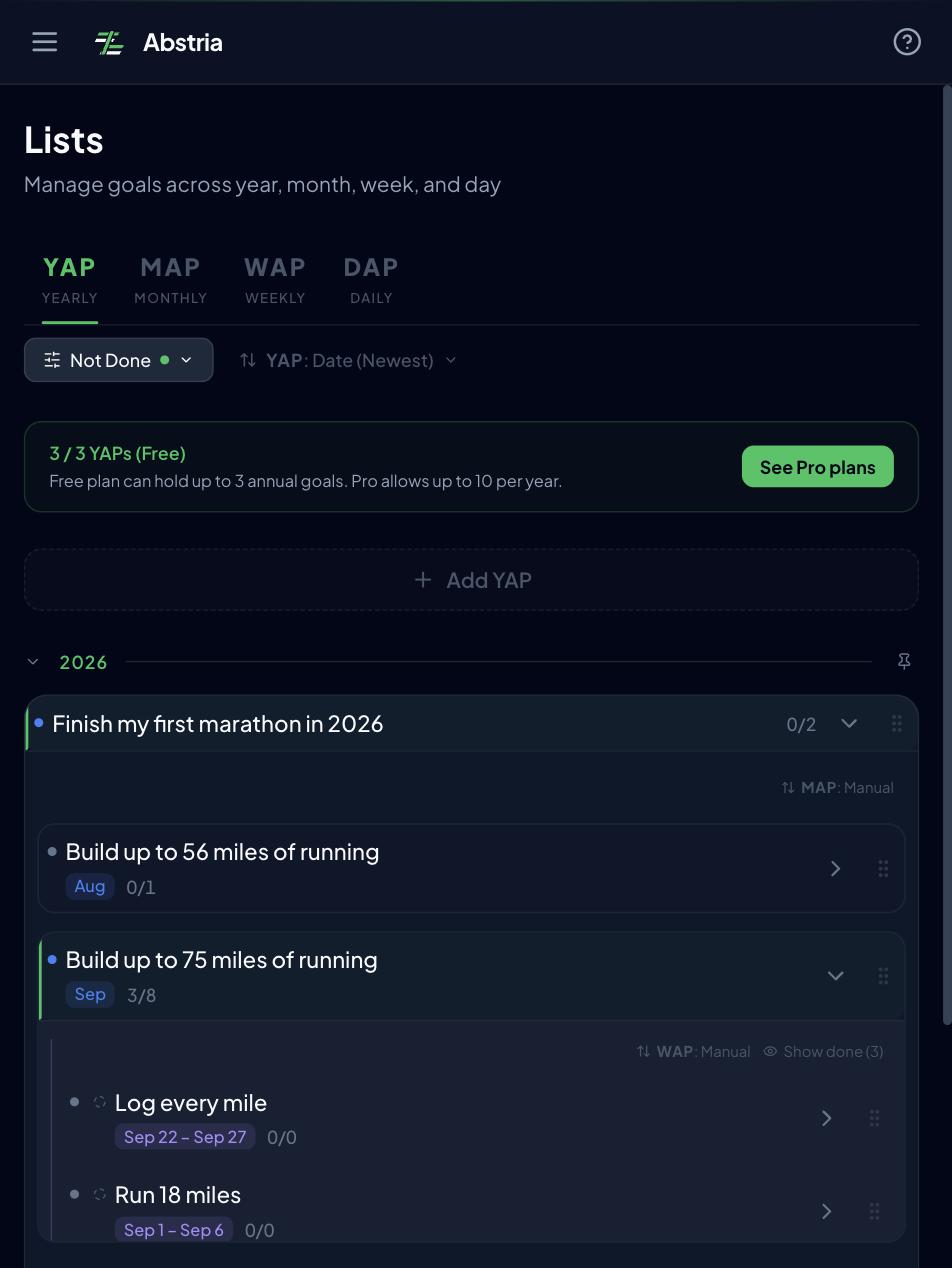
When you complete today's action and everything beneath a layer is done, the week, month, and year statuses update on their own. Where Todoist says "finish a task and your Karma goes up," Abstria says "finish a task and the goal hierarchy moves." That is easier to see than to read about, so there's a demo you can try without signing up. It takes about 30 seconds: watch one goal split into four layers, then check off today's action.
For a side-by-side look at Abstria and other tools, see the best goal setting apps compared.
Concept mapping: Todoist to Abstria
Here's what your Todoist concepts become in Abstria. Everyone uses Todoist differently, so this assumes the common "one project per goal" setup.
| Todoist concept | Abstria concept | Notes |
|---|---|---|
| Project (one goal) | YAP (yearly goal) | One year's worth of ambition. 3 max on Free. The project description moves to the YAP description (Markdown) |
| Section or sub-project | MAP (monthly goal) | Recast as a monthly milestone. "Phase 1 / Phase 2" splits get reassigned to specific months |
| Parent task (a chunk for this week) | WAP (weekly goal) | Up to 8 per MAP for the whole month. Parent tasks that had sub-tasks usually map here |
| Task or sub-task (today's work) | DAP (today's action) | Sits under a WAP. Closest to what showed up in your Today view |
| Priority (P1–P4) | Urgent / Important flags | Two axes instead of four levels. Read P1 as urgent + important, P2 as important |
| Recurrence (daily, weekly, monthly) | DAP recurrence settings | Daily, every X days, weekly (by weekday), monthly (by date), and end of month. Completing one reopens it on the next date |
| Due date and time | DAP scheduled date and start/end | Holds both the day and the time block |
| Labels (@home, @laptop) | (no equivalent) | Abstria has no tags or labels (as of September 2026). Keep them in a WAP/DAP description, or in Todoist |
| Inbox | Inbox | Where unattached tasks land. You can attach them to a WAP later |
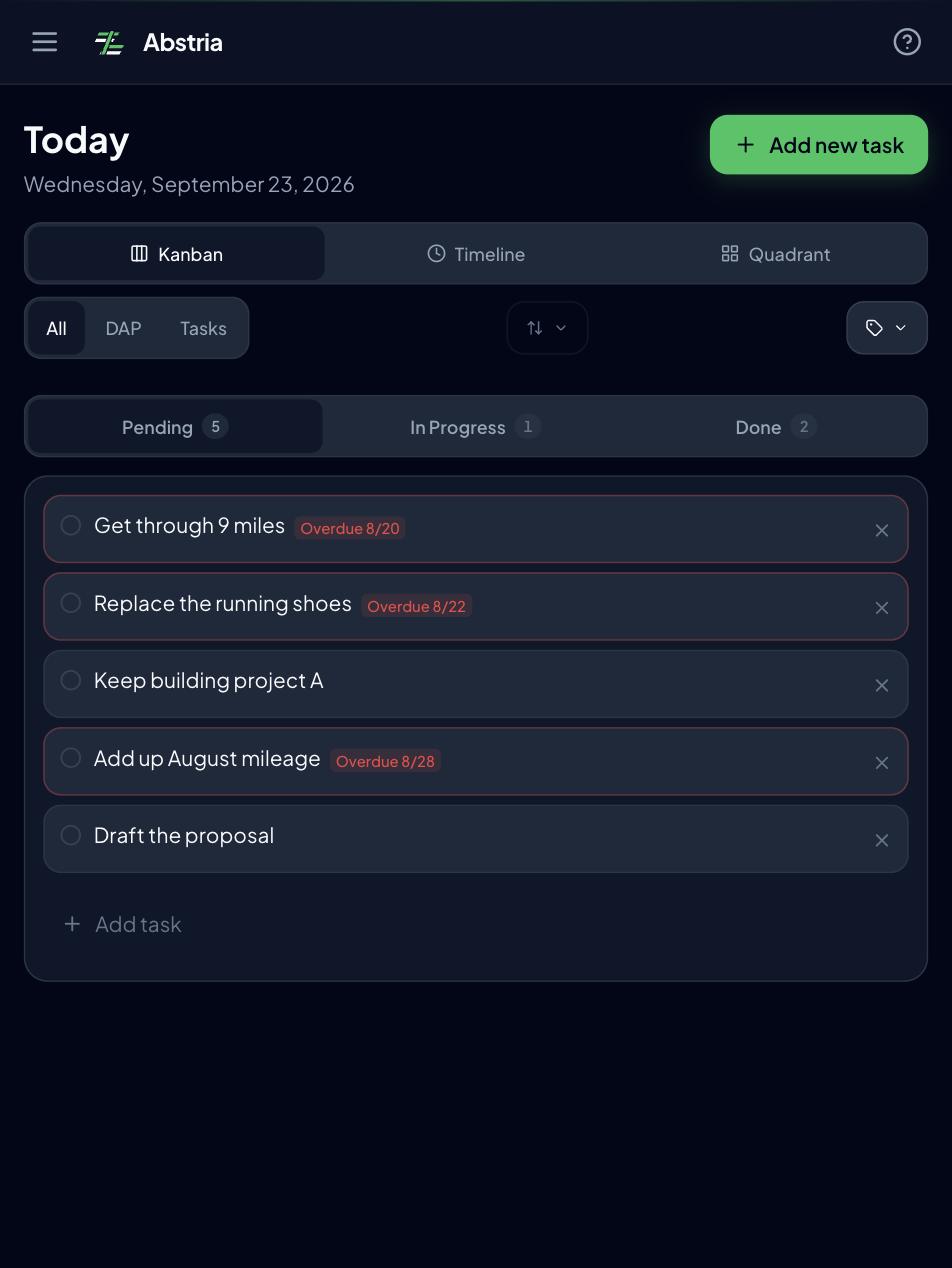
| Today view | Today screen | Today's actions on a To do / In progress / Done board |
| Upcoming view | Upcoming screen | Actions scheduled further out |
| Karma (completed-task targets) | Automatic status propagation | Progress is read as layers, not counts. Finishing today's action moves the week, month, and year |
| Rescheduling overdue tasks | Review screen | Carries unfinished actions from earlier months into a WAP this month |
Not every Todoist project needs to become a YAP. Buckets like "Shopping" or "Client requests" aren't goals: leave them in Todoist, or drop them in Abstria's Inbox. And some things, labels especially, have no counterpart at all. Abstria is deliberately narrow: it runs a goal hierarchy, and it isn't meant to replace Todoist outright.
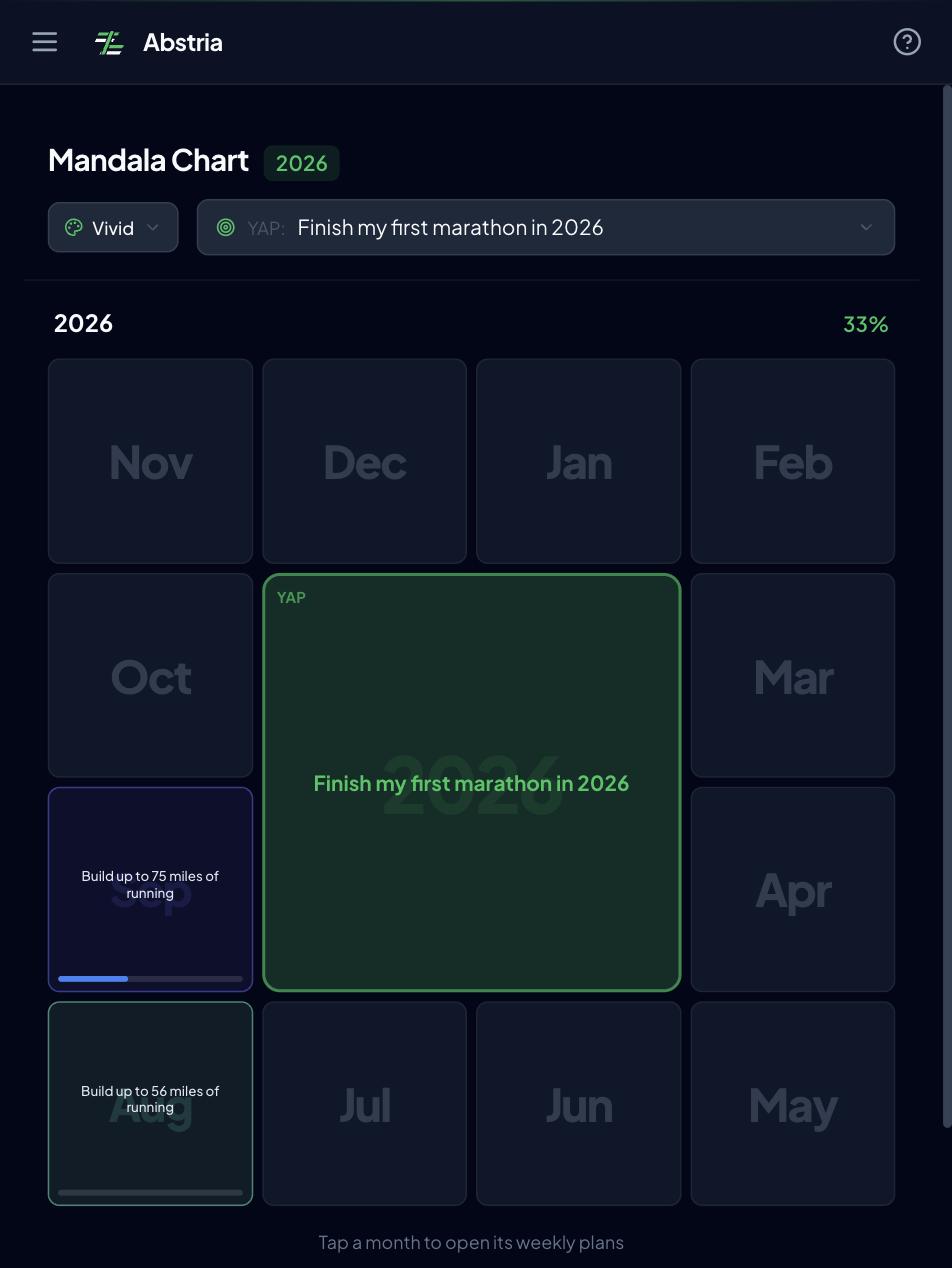
Abstria also has a Mandala screen: a 3x3 grid with a MAP in the center and its 8 weekly goals around it. If you used to list "things to do this week" under a section, drafting them here makes the eight-slot limit tangible.
How to migrate from Todoist to Abstria
One caveat up front: Abstria has no importer for Todoist CSV files or backups (as of September 2026). There's no import UI in settings and no Todoist-specific integration. So the baseline migration is manual: export a CSV copy from Todoist, then rebuild this month only in Abstria using the mapping table above.
That sounds like the long way around, but importing everything you've accumulated in Todoist just recreates the pile of goal-disconnected tasks in a new place. A migration is also a chance to re-pick only the actions that move a goal.
Step 1: Export your Todoist data to CSV as a backup
Two ways to get CSV out of Todoist:
- Export a single project. Open the project, click the three dots icon at the top right, select Manage data, then select Export as CSV (source: Todoist Help, "Import or export a project as a CSV file in Todoist", as of September 2026). The file includes TYPE (task, section, note), CONTENT, DESCRIPTION, PRIORITY, INDENT (nesting depth), and DATE (due date and recurrence) columns (source: Todoist Help, "Format a CSV file to import into Todoist", as of September 2026).
- Back up the whole account. From your avatar in the top left, open Settings and the Backups tab, then press Download next to a backup. You get a ZIP with one CSV per active project. This is a Pro and Business feature, available from the web and desktop apps (source: Todoist Help, "Download or restore backups in Todoist", as of September 2026).
If you only care about goals, export only the projects that hold them. Don't delete anything in Todoist at this stage.
Step 2: Pick 1 to 3 goal projects and create YAPs
Look at the export and your project list, then pick 1 to 3 goals you will genuinely push for the rest of this year. The Free plan caps YAPs at 3, which lines up with that shortlist. Non-goal projects stay out of it.
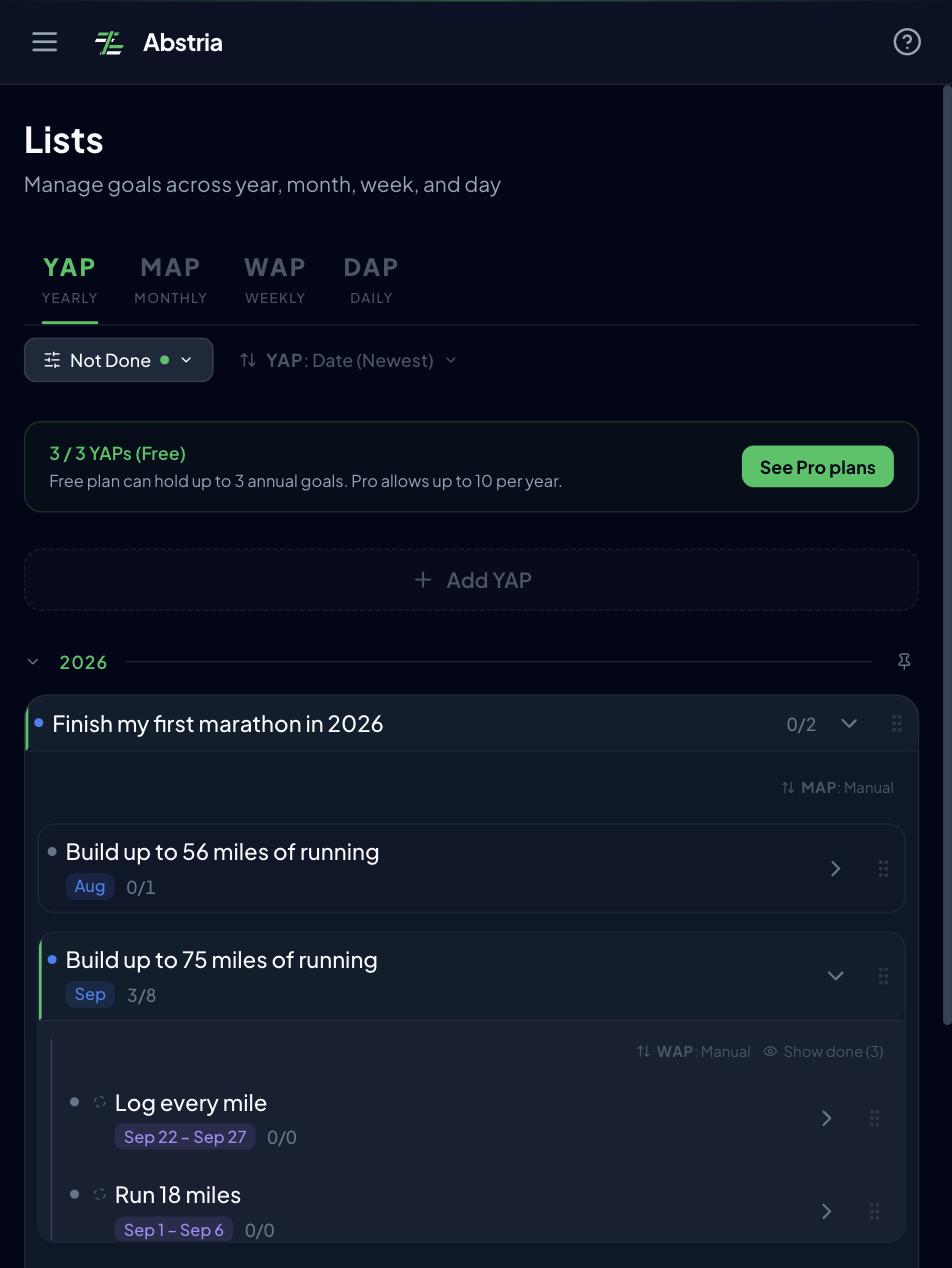
Create each one as a YAP from the Lists screen. Write the title as a single sentence you can judge yes or no at the end of the year: not "Spanish," but "Reach B2 in Spanish by December." Whatever context lived in the Todoist project description, along with your reason for choosing this goal, goes in the YAP description.
Step 3: Build this month's MAP and this week's WAPs (this month only)
Create one MAP under the YAP for the current month. Skip past months, future months, and anything already completed in Todoist.
Then pull the "this week" items out of the CSV and create up to 8 WAPs under that MAP — that's 8 for the whole month, not 8 per week, so in practice you're adding one or two for the coming week. Parent tasks become WAPs; their sub-tasks become DAPs. Anything that doesn't fit waits for a later week or sits in Inbox. For priorities, give P1 items both Urgent and Important, and P2 items Important.
Step 4: Choose 1 to 3 DAPs for today, set recurrence, and start running
Finally, pick 1 to 3 actions from your WAPs to run today as DAPs. Anything you had on repeat in Todoist (a 30-minute daily study block, say) becomes a DAP recurrence rule per the mapping table.
At that point your day runs on goals without your opening Todoist, and the migration can pause. What to do with the rest of your Todoist projects and your completed history can wait until you've run a week or two and decided this tool sticks.
Bulk import via the API (if you can write a script)
If you'd rather transform the CSV and load it in one shot, Abstria's API has POST /api/v1/imports, which accepts a nested JSON tree of YAPs, MAPs, WAPs, and DAPs in a single request. It doesn't accept CSV, so you'll need a script that converts the Todoist export into a tree like this:
{
  "yaps": [
    {
      "title": "Reach B2 in Spanish by December",
      "start_date": "2026-01-01",
      "maps": [
        {
          "title": "September: one full pass through 2,000 words",
          "start_date": "2026-09-01",
          "end_date": "2026-09-30",
          "waps": [
            {
              "title": "Vocab book, chapters 1-5",
              "start_date": "2026-09-14",
              "end_date": "2026-09-20",
              "is_important": true,
              "daps": [
                {
                  "title": "20 pages of vocab",
                  "scheduled_date": "2026-09-14",
                  "recurrence_type": "daily"
                }
              ]
            }
          ]
        }
      ]
    }
  ]
}
The conversion logic: rows where TYPE is section become MAPs, task rows with INDENT 1 become WAPs, task rows with INDENT 2 or deeper become DAPs, PRIORITY maps to is_urgent and is_important, and the recurrence text in DATE maps to recurrence_type. Todoist stores dates as natural language, so that last piece is where most of the work is.
External scripts authenticate with an API key (Authorization: Bearer abs_live_...). Keys are issued from the API section of settings and are Pro-only (if you're calling fetch from inside the browser while logged in, the session cookie works against the same endpoints). Per request the limits are 10 YAPs, 12 MAPs per YAP, 8 WAPs per MAP, and 200 DAPs per WAP, on top of your plan's own ceilings (Free allows 3 YAPs). Field details and samples are in the API reference.
Even with a script, do step 2 — narrowing to 1 to 3 goals — by hand.
What a week looks like after the move
From the week after migration, the rhythm looks like this. If you are in the habit of opening Todoist's Today view, that habit transfers directly to the Today screen.
- Monday. In the slot where you used to open Todoist, open Lists, review this week's WAPs, and pick your first DAP. If last week's review carried something over, make that the first one.
- Tuesday through Friday. Open Today and move DAPs across the To do / In progress / Done board. When everything under a layer is done, the WAP, MAP, and YAP statuses update automatically.
- Sunday. Instead of rescheduling overdue items one by one, look at what didn't finish this week and decide: carry it over, split it, or cut it. Then set up next week within the 8-per-month WAP budget. The procedure is in how to run a weekly review.
- End of month. Use the Review screen to decide which unfinished actions carry forward, and create next month's MAP.
Running Todoist and Abstria side by side
Only the goal hierarchy and its statuses move, so Todoist keeps its job. Dragging every unrelated errand into Abstria would also burn through the Free plan's 100 active items and mix chores into your goal tree. A reasonable split:
| Job | Where it goes | Why |
|---|---|---|
| Year/month/week/day goal layers and statuses | Abstria | The structure is fixed and completions propagate upward |
| Executing today's goal-facing actions | Abstria | Checking one off on the Today screen moves the goal |
| Errands, shopping, inbound requests | Todoist | Fast capture, and no reason to mix them into a goal hierarchy |
| Filtering by context or tool (labels, filters) | Todoist | Abstria has no labels or filters |
| Email forwarding and browser-extension capture | Todoist | Todoist's many entry points are a real strength. Move only the goal-related items into Abstria's Inbox later |
Archive the goal-shaped projects in Todoist and keep the chores. If goal work has two possible homes, you'll lose track of which one you used. When you inevitably capture a goal task in Todoist, move it to Abstria's Inbox or a WAP at the weekend and mark the Todoist copy done.
Treat the pairing as a division of labor, not as sync — there's no automatic sync between the two. If you also keep context and reflections in Notion, a three-way split works: Notion for background and records, Todoist for chores, Abstria for the goal hierarchy. The Notion side is covered in why goal management in Notion falls apart.
FAQ
Q. Can I keep using Todoist alongside Abstria?
Yes. Only the year/month/week/day goal hierarchy and its statuses move to Abstria; chores stay in Todoist. There's no automatic sync between the two, so pick one home — Abstria — for anything goal-related.
Q. What happens to my recurring Todoist tasks?
Abstria DAPs have recurrence too, with five options: daily, every X days, weekly (by weekday), monthly (by date), and end of month. "Every Monday," "every 3 days," and "last day of the month" translate directly. Completing an instance reopens it on the next scheduled date in the Today view. Multi-weekday rules like "every weekday" and natural-language entry aren't supported (as of September 2026).
Q. Can I import my Todoist data directly?
No. There's no importer for Todoist CSV files or backups (as of September 2026). The standard path is to export a CSV copy from Todoist and rebuild the current month by hand in Abstria. If you can write a script, POST /api/v1/imports accepts a nested JSON tree in one request (API keys are Pro-only; see the API reference).
Q. Can I go back to Todoist if I change my mind?
Yes. You can export everything from Abstria as JSON or CSV at any time, from the Data export section of settings or via GET /api/v1/export. JSON gives you one complete backup file; CSV gives you a ZIP with one file per table. Todoist can import CSV from a project's menu (source: the Todoist help article on CSV formatting cited above), so reshaping Abstria's CSV into Todoist's column format gets you back, though you have to map the columns yourself.
Q. How far does the free plan go?
The Free plan gives you 3 YAPs and 100 active items, with full access to the mandala view and all four layers. Moving 1 to 3 goal projects while leaving chores in Todoist — the setup this article recommends — fits inside Free. Pro ($9/month as of September 2026) raises the limits to 10 YAPs per year and 1,000 active items and unlocks API keys; see the pricing page. For reference, Todoist's Beginner (free) plan covers 5 personal projects and 3 filters, and Pro ($7 monthly, $60 annually under the pricing effective December 10, 2025) adds 300 projects, calendar layout, and task duration (source: Todoist pricing, Todoist Help, "Todoist Pro plan: pricing update", as of September 2026).
Start with just this month
Tasks move and goals don't because task management and goal management are different jobs. You don't have to abandon Todoist. Hand the goal hierarchy to Abstria, keep the chores where capture is fastest, and let each tool do what it's good at.
Start with the no-signup demo and watch one checkbox move a week, a month, and a year.
See Abstria in action (no signup)
If that clicks, the Free plan is enough to build this month's YAP, MAP, and WAPs for the one or two projects that are really goals. Abstria is invite-only as of September 2026, and we're onboarding people in order of request.
Already have an invite code? Go straight to create your account.
<!-- TODO(release): Once invite-only ends, switch this section's CTA from /invite back to /signup. Trigger: the invite gate in apps/web/middleware.ts (signed-out + /signup + no referral_pending cookie -> redirect to /invite) is removed. Three edits: (1) delete the sentence "Abstria is invite-only as of September 2026, and we're onboarding people in order of request." (2) replace "[Request access](/invite)" with "[Start free](/signup)". (3) delete the line "Already have an invite code? Go straight to [create your account](/signup)." ja.md has the matching TODO(release) in the same section; change both together. Verified 2026-09-23: the referral_pending gate in middleware.ts is still in place, so /signup still requires an invite code. -->