Draft (unpublished)
Best Goal Setting Apps Compared
Goal setting apps for individuals, compared on yearly-to-daily breakdown, review, and free plans: Notion, Todoist, TickTick, Habitica, Trello, and Abstria.
- comparison
- goal setting
This comparison is for people managing their own goals. It is not about HR performance reviews or team OKR platforms, so if you need shared dashboards and one-on-one meeting features, look elsewhere.
You have tried Notion or Todoist. You keep checking tasks off, and yet none of your goals feel any closer. You wrote a yearly goal down in January and never broke it into months and weeks. This article is here to help you decide what to use next.
Most apps that show up under "goal setting app" are really task managers, habit trackers, or note apps. Any of them can hold a goal, but they are good at very different things. The short version:
- You already live in Notion or Todoist and want your goals there too: add a goal hierarchy to the tool you have (each section below explains how). Abstria is the fallback if that stops working
- Your goal is literally a daily habit: TickTick, or Habitica if simply showing up is the hardest part
- You have few goals and want one board to see them: Trello
- You do not want another app: Google Tasks plus Google Calendar
- You want a yearly goal broken down to months, weeks, and today, with progress flowing back up: Abstria
All of them have a free tier. Abstria's is invite-only as of September 2026, so you need a code to open an account.
How to choose a goal setting app: three criteria
Every app on this list can store a task and mark it done. The difference is how they bridge the gap between "my goal for the year" and "what I do today."
Can it break a goal into year, month, week, and day?
"Get good enough at Spanish to work in it" is not something you can do today. It becomes actionable only after you split it into a monthly target, a weekly plan, and a concrete action for today.
So the first question is whether the app models that hierarchy at all, how many levels deep it goes, and whether you can trace today's action back to the yearly goal it belongs to. Faking the hierarchy with nested subtasks does work, but it costs more upkeep than an app that ships with the time levels built in.
Does progress roll back up so you can review it?
When you complete today's action, does anything change at the week, month, or year level? If completion stops at the task, you get the familiar feeling of clearing a list while the goal sits still.
The second half of this criterion is carry-over: does the app give you a place to move unfinished work into next week or next month? The review routine itself is covered in how to run a weekly review.
How far does the free plan get you?
Every app here has a free plan; what differs is what is inside it. Check the caps on projects or lists, how long history is kept, and whether calendar views and statistics cost extra. That tells you roughly when you will hit the paywall.
Goal setting app comparison table
| Tool | Hierarchy | Review and progress | Free plan | Platforms | Paid price |
|---|---|---|---|---|---|
| Abstria | Yes (year, month, week, day) | Yes (completion rolls up automatically) | 3 yearly goals, 100 active items | Browser | Pro $9/mo |
| Notion | Partial (build it with databases and relations) | Partial (roll-ups you build yourself) | Unlimited blocks for personal use | Browser, desktop, mobile | Plus $12/user/mo (monthly) or $10/mo billed yearly |
| Todoist | Partial (projects plus 4 levels of subtasks) | Partial (Karma, 1 week of history on free) | 5 personal projects, 3 filters | Browser, desktop, mobile | Pro $7/mo (monthly) or $5/mo billed yearly |
| TickTick | Partial (folders, lists, sections, tasks, subtasks) | Partial (stats and habit logs, basic on free) | 9 lists, 5 habits | Browser, desktop, mobile | Premium $49.99/yr |
| Habitica | No (habits, dailies, and to-dos only) | Partial (streaks and XP) | Core features are free | Browser, mobile | Subscription $4.99/mo |
| Trello | Partial (boards, lists, cards, checklists) | No (manual) | 10 boards per workspace | Browser, desktop, mobile | Standard $5/mo billed yearly ($6/mo monthly) |
| Google Tasks + Calendar | Partial (lists, tasks, one level of subtasks) | No (manual) | Free | Browser, mobile | n/a |
How to read this: "Yes" means the app ships the capability, "Partial" means you can approximate it with configuration or manual routine, "No" means it is absent, and "n/a" means not applicable. Prices and free-plan limits reflect each vendor's official pricing pages as of September 2026, in USD.
Seven goal setting apps reviewed
Abstria
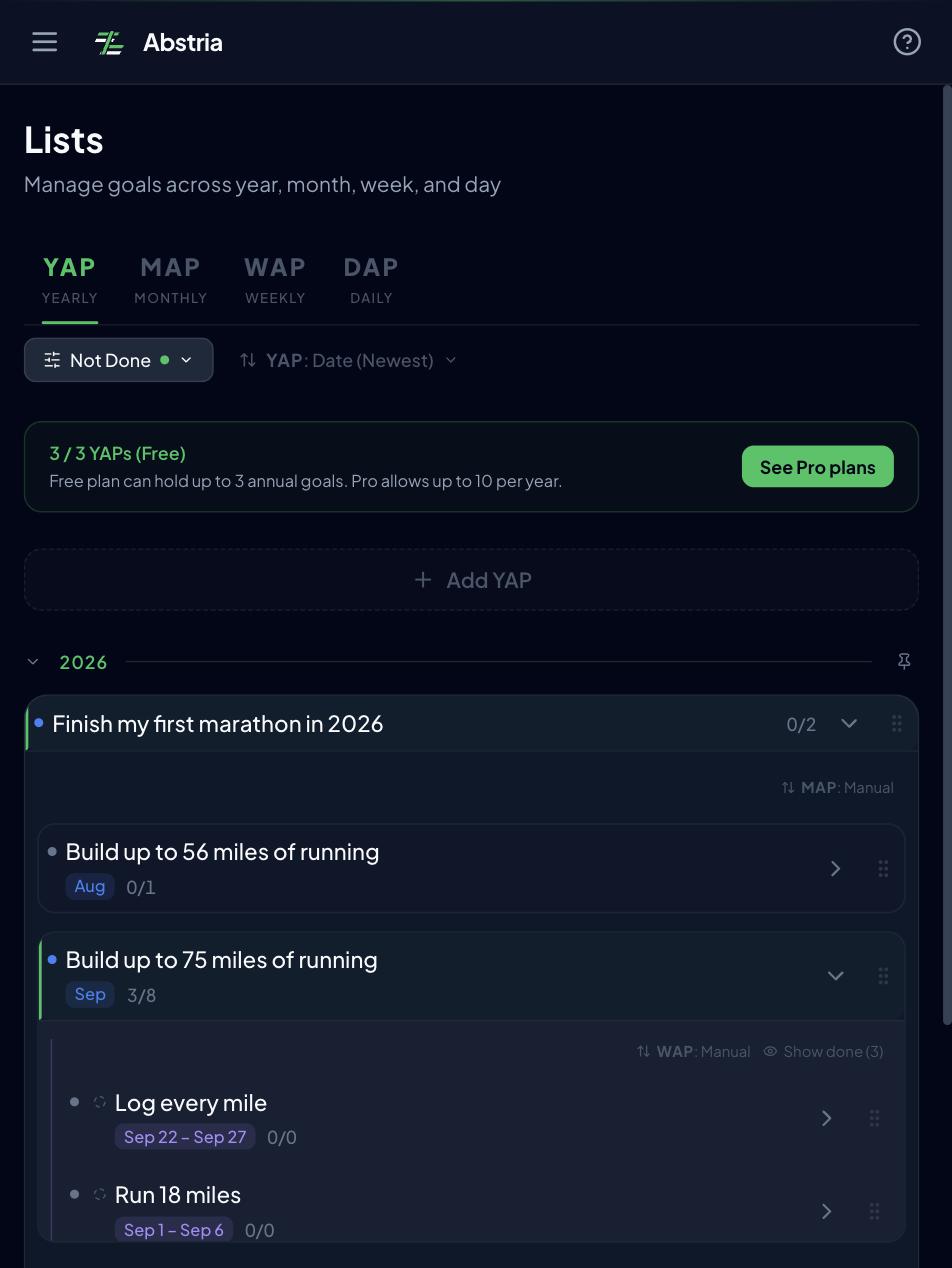
Abstria is a browser-based app for individuals that models goals in four levels: Year Action Plan (YAP), Month Action Plan (MAP), Week Action Plan (WAP), and Daily Action Plan (DAP). A monthly goal holds up to eight weekly plans, so every month you have to pick the eight things that matter most. Eight is not arbitrary: it matches the eight cells surrounding the center of a mandala chart, and the Mandala screen lays them out in exactly that 3x3 grid.
What works
- The year, month, week, and day levels are built in, so you never have to invent a hierarchy out of nested subtasks
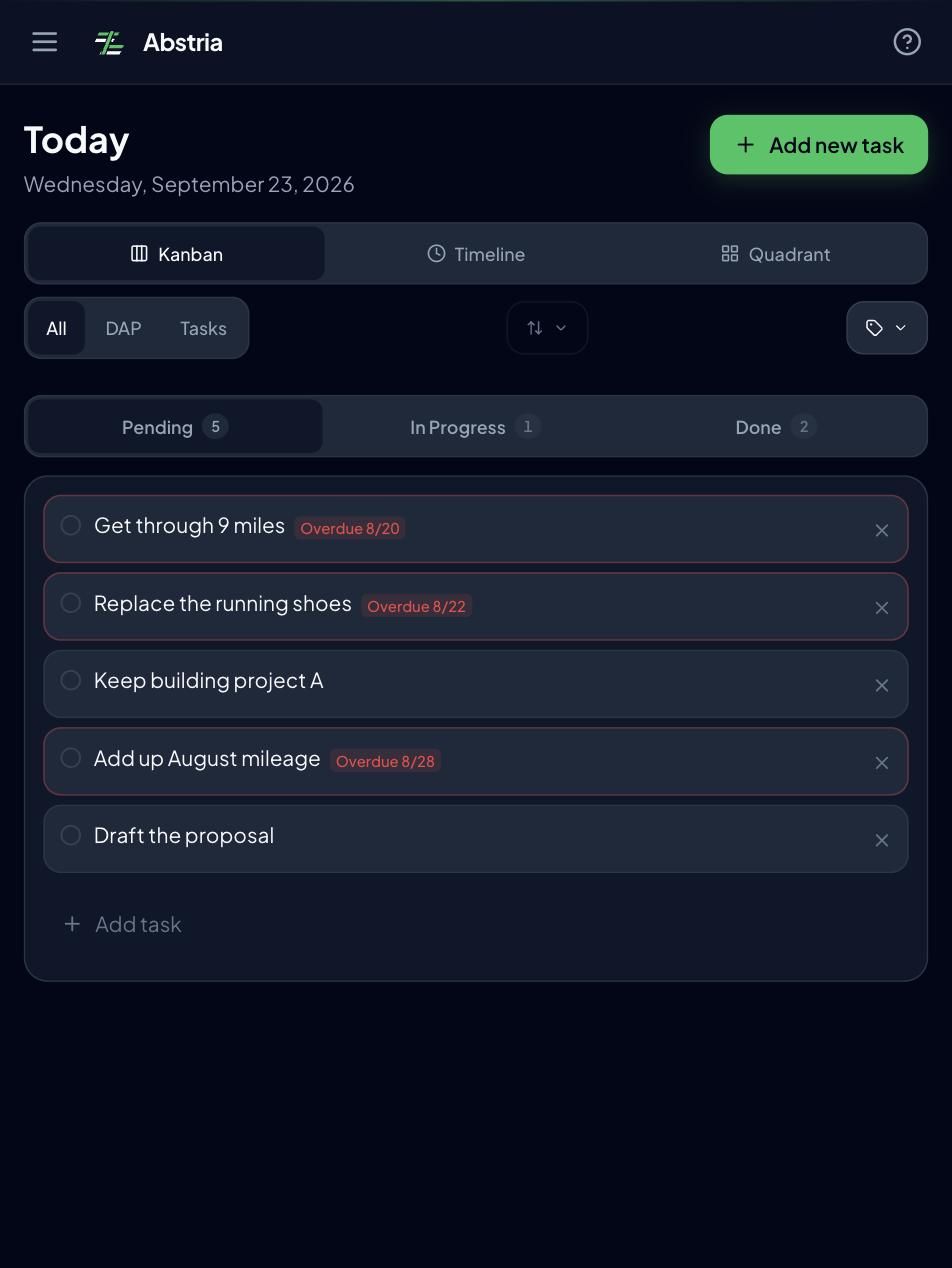
- Completing today's action propagates status up to the week, month, and year. When everything underneath is done, the parent closes too, so you do not get the "tasks done, goal unmoved" gap
- The Review screen collects every action left unfinished in earlier months. At the start of a month you simply decide which of this month's weekly plans each one belongs to, and the carry-over is done. Nothing gets buried in a past month, and you do not have to invent and maintain a review ritual of your own
- The Mandala screen puts this month's goal in the center of a 3x3 grid, surrounded by the eight weekly plans. If you want to use a mandala chart as an execution plan, see mandala chart apps compared
- The Free plan covers 3 yearly goals and 100 active items (as of September 2026). The four levels, automatic roll-up, Review, and Mandala all work the same on Free
What is missing
- It runs in the browser; there is no native mobile app (as of September 2026)
- It is built for one person, with no sharing or collaborative editing
- There is no dedicated habit tracker or Pomodoro timer. Recurring behavior is handled as weekly plans and daily actions
- Importing data is only available through the API (
POST /api/v1/imports, JSON), and API keys are Pro-only. Export to JSON and CSV (as a ZIP) is available from Settings
Who it fits
It fits people who set a yearly goal and never get it down to months and weeks, and people who clear tasks without feeling any goal move. It does not fit people who need to share goals with a team, who want native mobile notifications, or whose main need is a daily streak counter.
You can watch the four levels and the automatic roll-up in action in the demo on the landing page.
Notion
Notion is a workspace that lets you combine notes and databases however you like. There is no goal feature as such, but if you connect databases for yearly goals, monthly goals, and tasks with relations, you can build whatever hierarchy you want.
What works
- The personal Free plan has unlimited blocks. Aside from 7-day page history and a 5MB per-file upload limit, goal tracking rarely pushes you into a paid plan (source: Notion pricing, September 2026)
- Goals, review notes, and reference material all live in one place. If you want to write about why a goal matters and what you learned, it beats a pure task tool
- The template gallery lets you clone someone else's goal system instead of designing one
What is missing
- The hierarchy, the progress roll-ups, and the weekly review routine are all yours to design and maintain
- Completing a task does not move the status of the monthly or yearly goal. You reproduce that with roll-ups and formulas
Who it fits
It fits people whose notes and documents already live in Notion. Building a Notion system purely for goal tracking is usually more setup work than it is worth. If you have outgrown a Notion setup, moving off Notion for goal tracking walks through the migration.
Todoist
Todoist is the classic task manager: projects hold sections and tasks, and subtasks nest up to four levels deep (source: Todoist help: introduction to sub-tasks).
What works
- Natural language input ("every Monday at 9am") and rock-solid sync across browser, desktop, and mobile keep capture friction low
- Treat a project as a yearly goal, sections as months, and subtasks as weeks and days, and you can approximate the breakdown
- Completed history and Karma show how much you are getting through
What is missing
- The Free plan caps you at 5 personal projects, 3 filters, and 1 week of activity history. Running several goals and reviewing over a longer horizon effectively requires Pro ($7/mo monthly, $5/mo billed yearly; sources: Todoist pricing and the Pro pricing update, effective December 10, 2025, checked September 2026)
- The hierarchy is task nesting, not time. Keeping "this month's goal" distinct from "this week's plan" is a naming and labeling discipline you enforce yourself
- The documented parent-child behavior is that uncompleting a subtask reopens the parent; the help center does not describe a parent task auto-completing when all subtasks are done. Plan on closing parents yourself (source: Todoist help: complete or uncomplete a task)
Who it fits
It fits people already running their day in Todoist who want to bolt a goal hierarchy on top. If you would rather the tool owned the hierarchy and the review, that overhead stays with you here. Moving from Todoist to goal-first planning covers that transition.
TickTick
TickTick bundles a task manager with a habit tracker, a Pomodoro timer, and calendar views, so today's tasks, your habits, and your focus time sit in one app.
What works
- The habit tracker is built in, with streaks and statistics that tell you whether something is actually sticking
- Calendar views include year, month, week, and agenda, so you can see tasks on a timeline (source: TickTick features)
- Premium is $49.99/year (about $4.17/month), on the lighter end of the task managers compared here (source: TickTick upgrade page, September 2026)
What is missing
- Free gives you 9 lists, 5 habits, and only the basic calendar and statistics. One list per goal plus statistical review means Premium
- Folders, lists, sections, tasks, and subtasks are organizational (source: TickTick help: manage tasks with folders), not a chain you can trace from a yearly goal to today's action. The link between goal and habit is one you hold in your head
Who it fits
It fits people whose goal is already shaped like a habit, such as "30 minutes of Spanish every morning." For goals that need to be broken into monthly and weekly stages, the weak hierarchy shows.
Habitica
Habitica turns habits, dailies, and to-dos into RPG character progression. Completing tasks earns experience and gold; skipping them costs you health.
What works
- The core product is free. The subscription ($4.99/month, $47.99 for 12 months) buys gems and cosmetic gear rather than goal features (source: in-app purchase prices listed on the Habitica App Store page, September 2026)
- The "you lose something if you skip" mechanic genuinely helps people who struggle to start
- Parties let you keep habits going alongside friends
What is missing
- There are three lists (habits, dailies, to-dos) and no structure for decomposing a goal
- XP and levels measure volume completed, not how far any particular goal has progressed
Who it fits
It fits people for whom consistency itself is the obstacle and who need rewards or penalties to get moving. It does not fit people who want a numeric view of goal progress.
Trello
Trello is a kanban tool: lists on a board, cards you drag across them. On your own, you can set up lists such as Goals, This month, This week, Today, and Done.
What works
- Dragging cards left to right is immediate and makes progress visible
- Free gives you 10 boards per workspace with unlimited cards, plenty for personal use (source: Trello pricing, September 2026)
- Checklists inside a card let you treat one card as one goal and track the supporting actions inside it
What is missing
- The hierarchy is four levels (board, list, card, checklist), and the list order represents a stage of progress. Splitting by year, month, and week means separate boards or a labeling convention
- Completing a card does not move any other card, so review is manual. Butler automation on Free is capped at 250 runs per workspace per month
Who it fits
It fits people with a small number of goals who want a single board showing what stage each one is at. Fine-grained decomposition and long-horizon review mean a lot of manual work.
Google Tasks + Google Calendar
Google Tasks is the task list that lives beside Gmail and Google Calendar, free with any Google account. The hierarchy is three levels (list, task, subtask), and subtasks cannot nest further (Google standardized on a single level of subtasks in 2019; source: Google Workspace blog: upcoming changes to the Google Tasks API).
What works
- No new app to install: today's tasks sit next to your mail and your calendar
- Tasks appear on the calendar, so commitments and actions share one timeline
- It costs nothing extra
What is missing
- With only one level of subtasks, you cannot express a yearly goal down to today's action in a single chain. You end up with one list per goal instead
- There is no review or statistics feature; completed tasks simply disappear from the list
Who it fits
It fits people with one or two goals who mainly want today's tasks next to their schedule. Anyone decomposing goals in stages and tracking progress will outgrow it.
Goal setting app FAQ
Q. What is the difference between a goal setting app and a task manager?
A goal setting app handles the hierarchy from goal to today's action and the progress that flows back up, while a task manager handles today's list and its completion. You can track goals in a task manager, but the hierarchy, the review, and the progress roll-up become your manual routine. If you want to decompose goals in stages and follow them over months, an app with the levels built in costs you less upkeep.
Q. Are there free goal setting apps?
Yes, all seven apps compared here have a free plan you can start on. Google Tasks and Habitica are free for their core features, and Notion has unlimited blocks for personal use. Todoist (5 projects), TickTick (9 lists), and Abstria (3 yearly goals, 100 active items) cap the free tier by count, so match those numbers against how many goals you actually run (all as of September 2026). One caveat: Abstria's free plan is invite-only as of September 2026, so you need a code before you can use it.
Q. Should I use a habit tracker or a goal setting app?
Use a habit tracker if your goal is repetitive ("20 minutes a day"), and a goal setting app if it is staged ("ship it by June"). Habit trackers are built around sustaining one behavior and usually leave out the decomposition and progress views you need for several goals at once. If you have both kinds of goals, either treat the repeating behavior as a weekly plan inside your goal app, or pick one like TickTick that bundles a habit tracker.
Q. How do I estimate whether a free tier's limits will fit my goals?
Count the goal-level cap and the task-level cap separately. Todoist's 5 personal projects and TickTick's 9 lists become your goal limit if you give each goal one project or list. On Abstria's Free plan, 3 yearly goals is the goal-level cap, while 100 active items is the number of unfinished monthly goals, weekly plans, and daily actions combined (both as of September 2026). If you keep three or fewer yearly goals running and do not hoard unfinished actions, all four levels fit inside the free tier.
Q. How do I avoid abandoning a goal app after a few weeks?
Keep the number of goals small and schedule one weekly slot to look at them. Start with one goal for the month and a handful of actions for the week, and carry the leftovers into next week so there is always a reason to open the app. The carry-over routine is covered in how to run a weekly review.
That last answer, carrying leftovers into next week, is exactly what Abstria's Review screen does: unfinished items stay in one list, and assigning them to a weekly plan for this month completes the hand-off.
Want to see it move first? The demo on the landing page shows completion flowing back up to the parent goal. No signup, no data entry, just a button to mark something done.
Abstria's Free plan covers 3 yearly goals and 100 active items. Access is invite-only as of September 2026, so if you do not have a code you can request access. If you do have one, you can sign up here. Full details are on the pricing page.
<!-- TODO(release): Just before publishing, check whether invite-only has been lifted. If it has, fix three places: (1) drop the invite sentence and the /invite link above, making /signup the primary CTA; (2) delete "Abstria's is invite-only as of September 2026, so you need a code to open an account." from the intro; (3) delete the "One caveat: Abstria's free plan is invite-only..." sentence from the "Are there free goal setting apps?" FAQ. If it ships while still invite-only, leave all three as they are, and make sure the Japanese edition carries the same caveat in its intro and FAQ (it currently does not) so the two languages do not disagree. Where to check the trigger: apps/web/middleware.ts, the referral_pending handling. -->