Draft (unpublished)
Best Mandala Chart Apps in 2026
Mandala chart apps compared on three things: turning the 9x9 goal grid into dated work, tracking progress, and where each free tier stops.
- Comparison
- Mandala chart
This comparison is written for individuals who want to set a goal and actually execute it. If your main purpose is sharing and editing one chart with a team, skip ahead to the Miro section.
The short version: if you want to fill in 81 cells and keep them somewhere you can glance at them, a dedicated chart app is enough. If you want the chart to turn into monthly, weekly, and daily work — and to see progress flow back into it — you need a tool with a time hierarchy, which is where Abstria comes in. Use-case picks are at the end.
How to choose a mandala chart app
Every tool here can put text into nine boxes. The differences show up after the chart is finished, so that is where the criteria sit.
Does the chart turn into dated work?
A mandala chart (also called a mandalart, a 9x9 goal grid, or the Ohtani goal sheet) puts one goal in the center, splits it into 8 themes, and splits each theme into 8 actions. What those 64 actions never carry is a when.
So the first question is whether the app can take you from "this is my theme for the month" to "this is my goal for the week" to "this is what I do today." Note that grid depth and time depth are not the same thing: being able to expand 9 cells into 81 cells is structural nesting, not scheduling. The comparison table treats them as separate columns.
Does progress come back to the chart?
Once you have done the work, does the chart know? Even a checkmark or a color change beats paper. The bigger lever is what happens to the things you did not finish: if the tool can carry them into next week or next month, you stop rebuilding the chart from scratch every cycle.
Where the free tier ends
Every tool below has a free tier, but they stop in different places. Some let you build charts forever for free and charge for extras such as widgets, AI generation, or removing ads. Others cap how many boards or goals you can keep active. Read the free-tier column together with the paid-price column and decide which limit would actually bite given the way you work.
One note on Abstria: as of September 2026 it is invite-only, so even the Free plan requires requesting access. The demo on the landing page needs no account.
Mandala chart app comparison
| Tool | Breaks goals into dated work | Progress tracking | Free tier | Platforms | Paid price |
|---|---|---|---|---|---|
| Abstria | Yes (year, month, week, day) | Yes (completion rolls up automatically) | 3 YAPs, 100 active items | Browser (invite-only as of Sep 2026) | Pro $9/mo |
| MandalaChart Official App | Partial (9-box nesting) | Partial | Free version with in-app Pro | iOS, iPadOS, macOS, Android, web | — |
| MandalaChart AI | Partial (9-box nesting) | Partial | Free version with in-app Pro | iOS, Android | Pro $9.89/mo or $59/yr (in-app) |
| Mandala Chart for Obsidian | Partial (9x9 in a note) | Partial (markdown checkboxes) | Free, open source (MIT) | Obsidian on desktop and mobile | Free |
| Mandalart AI (web) | Partial (AI-generated 9x9) | No (manual) | Free, no signup | Browser | Free |
| Miro | Partial (free-form canvas) | No (manual) | Free plan, 3 editable boards | Browser, iOS, Android | Starter $8/user/mo (billed yearly) |
| Google Sheets / Excel | Partial (depends on template) | No (manual) | Google Sheets is free | Browser, desktop, mobile | — |
How to read this: "Yes" means the app does it as a built-in feature, "Partial" means you can get there manually or only part of the way, "No" means it is not supported, and "—" means the official sources did not state a current price. Prices and free tiers reflect what the official stores and sites listed in September 2026. Excel requires a Microsoft 365 subscription; Google Sheets is free with a Google account.
<!-- TODO(verify-manually): Install MandalaChart Official App on a device and read the in-app purchase screen to get the current Pro price (monthly vs one-time, and the annual price), then fill in the "Paid price" column. Leave "—" until confirmed. Already checked: as of 2026-09-23 the App Store listing (id1622352017) still shows three tiers side by side — "MandalaChart Pro ¥100 / MandalaChart Pro (annual) ¥1,200 / MandalaChart Pro (annual) ¥200" — with no way to tell which is live. Google Play (com.mandalachart.android) only shows a range, "¥100–¥1,200 per item". The same TODO exists in ja.md --> <!-- TODO(verify-manually): Open MandalaChart AI (Mandala AI) on a device or sign in on the web and check what the free tier includes — specifically whether AI generation is capped per day and what Pro unlocks — then add it to the "Free tier" column. Already checked: prices are confirmed (App Store id6737715499 lists "Mandala AI Pro Version Monthly $9.89" and "Mandala AI Pro Version Annual $59.00"; Google Play com.mandalachart.ai shows "$9.89 - $59.99 per item"), but neither listing states any free-tier generation limit as of 2026-09-23 -->Reviews
Abstria
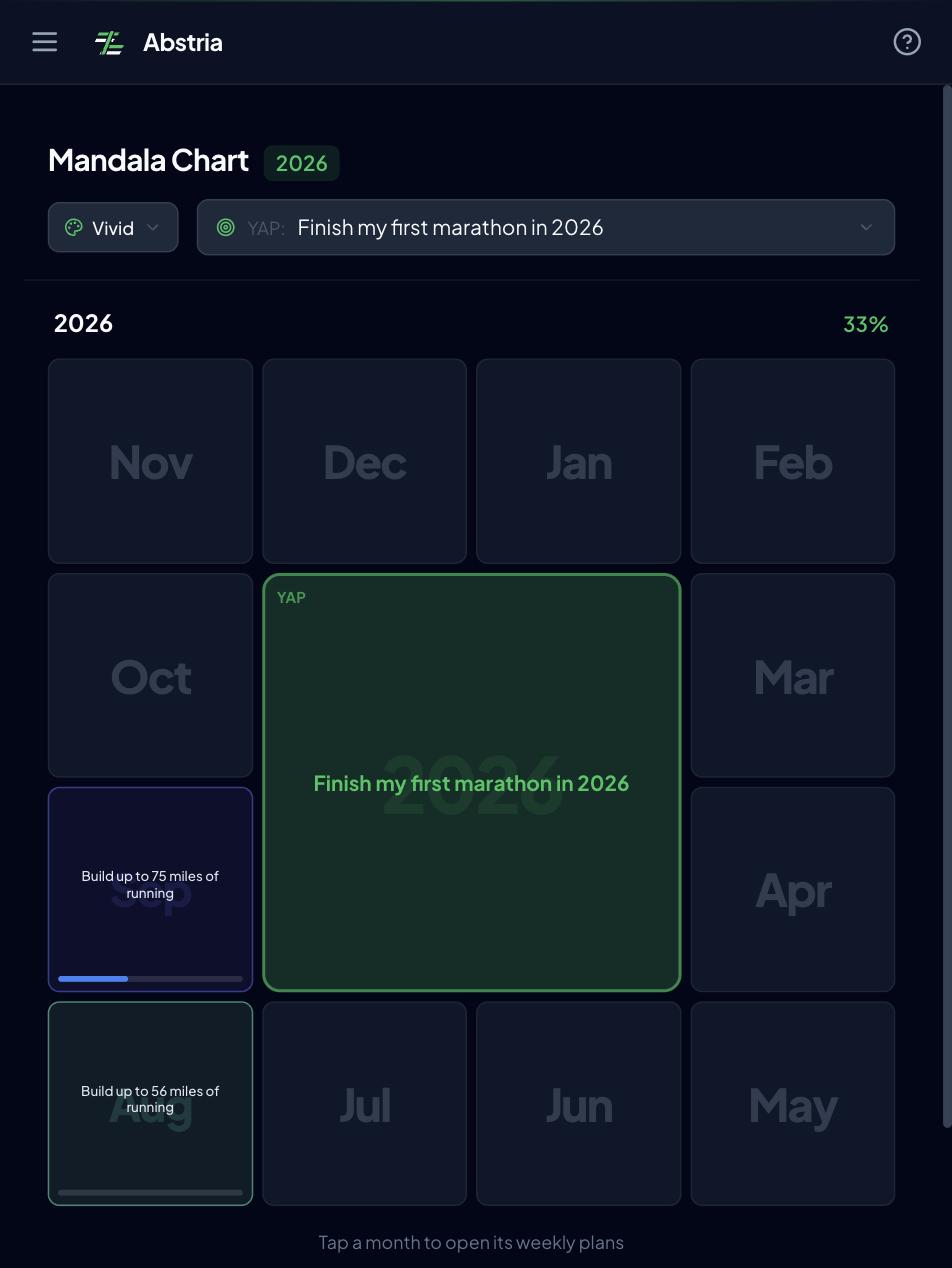
Abstria is a goal app built on four layers — year, month, week, day. Its mandala screen is a 4x4 grid where all twelve monthly goals (MAPs) for the year sit on one sheet. Open one block and the center is that month's goal, with up to 8 weekly goals (WAPs) around it. Because a whole year fits on a single view, you can move between "how is the year going" and "what is this month about" without switching screens.
At the start of the month you put the monthly goal in the center and lay out the month's weekly goals around it. During the week you open a cell, add the tasks you will actually do, and check them off. Completion propagates upward: when everything under a weekly goal is done, the weekly goal closes, and the same happens at the month level.
At the end of the month you set next month's goals first, then open the Review screen and carry unfinished tasks into the new month's weekly goals. Goals themselves get rewritten deliberately, but you never re-type your leftovers.
If you want to feel the flow before creating an account, the landing page demo walks through breaking a goal down and completing it.
See a mandala chart in action in your browser (no signup)
What's good
- Execution flows back into the chart without re-typing, so reviews do not require comparing two tools side by side
- Unfinished tasks carry into next month's weekly goals from the Review screen
- One screen shows the whole year and the current month at the same time
What's missing
- Invite-only as of September 2026, so signing up requires requesting access. The demo is open to anyone
- The 8 surrounding cells are fixed to that month's weekly goals; you cannot redefine what a cell means
- Browser-based, with no native iOS or Android app
- No sharing or collaborative editing
Good fit / poor fit
- Good fit: you want the chart to become monthly goals, weekly goals, and today's tasks, with progress visible back on the chart
- Poor fit: you want 81 free-form cells for thinking, or a chart your team edits together
MandalaChart Official App
This is the official app for the Mandala Chart method devised by Yasuo Matsumura, published by MK-International. It runs on iOS, iPadOS, macOS, and Android, and the basic interaction is tapping a 3x3 cell and filling it in. The store listing describes 9-box thinking templates, multi-device sync via Google Drive, PDF export, printing, and a dark theme. A browser version for desktop editing is offered separately at mandalachart.com.
What's good
- The official implementation of the framework, so the structure matches how the method is taught
- PDF export and printing let you put the chart back on paper
- Google Drive sync covers phone, tablet, and desktop
What's missing
- There is a Pro in-app purchase, and the store listing makes it hard to tell where the free version stops
Good fit / poor fit
- Good fit: you want the canonical format, and you want charts you can print or hand over as a PDF
- Poor fit: you want one app for both the chart and daily task management
Sources: App Store: MandalaChart Official App / Google Play: MandalaChart Official App
<!-- TODO(verify-manually): Install MandalaChart Official App on a device, open a cell's edit screen, and check whether a per-cell progress percentage can be set. If it can, strengthen the "Progress tracking" cell in the table (currently "Partial") and this section. Already checked: third-party reviews mention a progress percentage and per-cell URL links, but the App Store description does not say so as of 2026-09-23, and the Mandala Chart association's page only says "reviewing and managing progress" without naming a feature. The same TODO exists in ja.md -->MandalaChart AI
The same publisher's AI-assisted app, listed as "Mandala AI" on the App Store and Google Play. Instead of starting from an empty grid you feed it source material — a web page, a PDF, an image, or audio — and it drafts a mandala chart from it, which you then edit by hand. It is the fastest way to get an initial 81 cells when the blank page is the blocker.
What's good
- Turns existing material into a first draft, so you edit instead of inventing from nothing
- Keeps the same 9-box structure as the official app, so the output is still a normal mandala chart
What's missing
- AI drafts tend to be generic; the sub-goals usually need rewriting before they mean anything to you
- Like the official app, where the free version stops is not obvious from the listing
Good fit / poor fit
- Good fit: you stall on the blank grid and want a starting draft to react to
- Poor fit: you want the thinking itself to be the value of filling in the chart
Sources: App Store: Mandala AI App / Google Play: Mandala AI
Mandala Chart plugin for Obsidian
A free, open-source community plugin that renders an interactive 9x9 mandala chart inside an Obsidian note. It has a full-grid view and a focused single-theme view, supports markdown inside cells (so tags and internal links work), auto-saves, and prints to clean A4 landscape. It ships in five languages, including English.
What's good
- The chart lives next to your existing notes, so a cell can link straight to the note where the work happens
- Markdown inside cells means checkboxes, tags, and backlinks all behave normally
- Free under an MIT license, with no account required and no sync cost beyond the Obsidian sync you may already use
What's missing
- Requires Obsidian, so it is not an option if you do not already take notes there
- Any monthly or weekly structure is something you build yourself out of notes and daily notes
Good fit / poor fit
- Good fit: you already run your life in Obsidian and want the chart in the same vault
- Poor fit: you want a phone-first app you can open and tap without setup
Source: Obsidian community plugins: Mandala Chart
Mandalart AI (web)
A free browser tool that generates a 9x9 grid from a short description of your goal, with no signup. Cells are editable by double-clicking, and finished charts can be shared by link, downloaded as an image, or printed to PDF. Chat history is kept for seven days.
What's good
- Nothing to install and no account, so it takes under a minute to get a filled-in grid
- Share link, image download, and PDF export cover most ways you would want to keep the chart
What's missing
- There is no execution layer at all; once the chart is generated you are on your own
- With no account, long-term storage is the link or the file you saved, not the service
Good fit / poor fit
- Good fit: you want to try the format once, or produce a chart to print and pin up
- Poor fit: you want the chart to be a living document you return to every week
Source: Mandalart AI
Miro (mandala chart template)
Miro is an online whiteboard with a mandala chart template. The template itself is free and signing up does not require a credit card. You can invite people to the board, edit simultaneously, and leave comments.
What's good
- Several people can edit one chart at the same time, which suits team or family goals
- The chart can sit next to sticky notes, tables, and other artifacts on the same board
- Works in the browser and on iOS and Android
What's missing
- It is a general-purpose canvas, so there is no "tap a cell and fill it in" flow built for this format
- No month, week, or day layer, so scheduling the 64 actions happens somewhere else
- Marking things done is manual — sticky note colors or strikethroughs — and nothing rolls up
Good fit / poor fit
- Good fit: you want one shared, co-edited chart for a team
- Poor fit: you are an individual who wants the chart to drive daily execution
Sources: Miro: Mandala chart template / Miro: Pricing
Google Sheets and Excel templates
Not an app, but a legitimate option: merge cells into a 9x9 block, add borders, and you have the same layout without installing anything.
What's good
- You already know the tool, and there is nothing new to learn or pay for
- You can bolt on extra columns such as target week or status, and lay it out however you like
- Google Sheets can be shared with a link
What's missing
- Editing an 81-cell grid on a phone is painful
- Any month or week structure is a spreadsheet you have to design first
- Completion tracking and rollovers are entirely manual
Good fit / poor fit
- Good fit: you want to build carefully on a desktop and print the result for the wall
- Poor fit: you are phone-first, or you want the tool to handle execution
Pick by use case
- You want an AI draft instead of a blank grid: Mandalart AI for a free web draft, MandalaChart AI if you want it on your phone
- You want the canonical format, exported to PDF or paper: MandalaChart Official App
- You already live in Obsidian: the Mandala Chart plugin keeps the chart next to your notes
- You want a chart to print once and pin to the wall: Mandalart AI or a Google Sheets template
- You want a team to co-edit one chart: Miro, whose template is free
- You want the chart to become monthly, weekly, and daily work with progress flowing back: Abstria, which currently requires requesting access
If you have not built a chart yet, start with how to make a mandala chart, which walks through the 9x9 grid step by step. And if the mandala format is only one option you are weighing, the best goal setting apps compared covers general goal tools such as Notion and Todoist.
FAQ
Q. Which of these stop being free?
Miro and Abstria are the two with hard caps on the free tier. Miro's Free plan caps you at three editable boards, and Abstria's Free plan allows 3 YAPs (yearly goals) and 100 active items. The Obsidian plugin and Mandalart AI are free outright, while the two MandalaChart apps let you build charts for free and charge for extras through in-app purchases.
Q. What actually differs when editing 81 cells on a phone?
The difference is how each tool shrinks the grid without making it unreadable. The MandalaChart apps and the Obsidian plugin both offer a zoomed-out full view plus a focused single-theme view, which is the pattern that works best on a small screen. Miro gives you free zooming but no cell-by-cell fill-in flow, and spreadsheets are the hardest to edit on a phone because every cell needs precise tapping.
Q. Can I share a mandala chart with other people?
Yes, but the mechanism differs by tool. For real co-editing use Miro; for showing a finished chart use PDF export from the MandalaChart Official App or a share link from Mandalart AI or Google Sheets. Abstria is designed for individual use and has no sharing or collaboration as of September 2026.
Q. What should I weigh most when choosing?
Decide first what happens after the chart is finished, because that determines everything else. If the chart's job is to sit somewhere visible and keep you focused, optimize for how readable 81 cells are on your device. If its job is to drive execution, optimize for a month, week, and day breakdown and for progress that returns to the chart. The table above is built around that split.
If you want to try the part where the chart becomes weekly and daily work, the demo is the fastest way to see it. Watching completed tasks roll back up into the week and the month takes about a minute — less time than reading about it.
Try the mandala demo on the landing page (no signup)
To keep using it, request access. Abstria is invite-only as of September 2026 and we onboard in order. If you already have an invite code you can sign up here. Plan limits are listed on the pricing page.
<!-- TODO(release): If invite-only has ended by publication, replace the /invite CTA with /signup and delete the invite-only wording. Places to edit: the "One note on Abstria" paragraph in the intro / the Platforms cell of the Abstria row / the first bullet under "What's missing" in the Abstria section / the Abstria line under "Pick by use case" / this closing CTA --> <!-- TODO(image): Consider a second figure for the English version — a side-by-side of a static 81-cell grid and the same goals mapped onto a month/week timeline. alt: "A static 81-cell mandala grid next to the same actions placed on a monthly and weekly timeline". Reuse assets/ in this folder if added -->