Draft (unpublished)
How to Make a Mandala Chart
How to make a mandala chart (mandalart) in 4 steps: the 9x9 goal grid, filling the 64 action cells, and turning them into a monthly rhythm.
- Mandala chart
- Goal setting
A mandala chart usually peaks the moment you finish it. The 81-cell grid goes up on the wall, and a month later nobody looks at it. The problem is rarely the chart itself — it's that nothing brings you back to it. This guide walks through building a 9x9 grid from a blank page, what to do when you can't come up with eight of anything, and how to move those 64 action cells into a monthly, weekly, and daily rhythm you actually review.
What a mandala chart is: one goal, eight themes, 64 actions
A mandala chart (also called a mandalart) breaks a goal into three layers. There's a 9-cell version that uses only the center 3x3, and an 81-cell version (9x9) that surrounds it with eight more 3x3 blocks. For goal setting, the 81-cell version is the standard.
| Layer | Cells | What goes in it | Example (finishing a marathon) |
|---|---|---|---|
| Center | 1 | One goal with a deadline | Finish my first marathon in 2026 |
| Themes | 8 | What the goal depends on | Mileage, long runs, speed work, nutrition, sleep, weight, injury prevention, race strategy |
| Actions | 64 | Concrete behaviors per theme | Under "mileage": 120 km a month, three runs a week, a fixed morning slot |
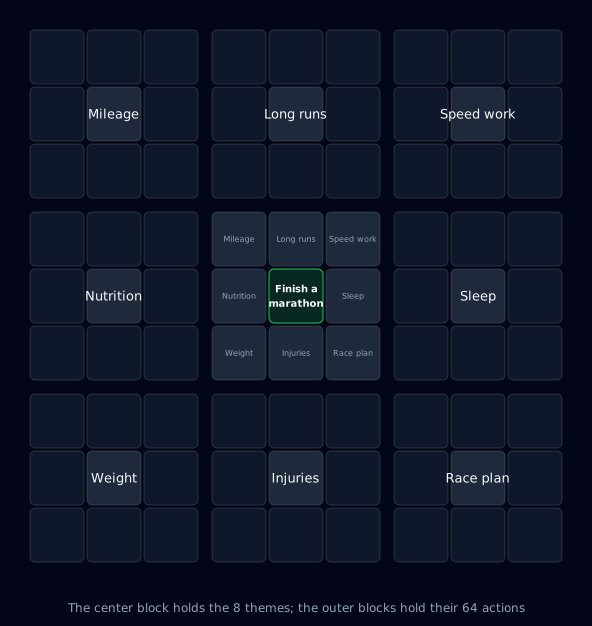
The format went global through Shohei Ohtani, who built one as a high school freshman with "get drafted first-round by eight teams" in the center and eight themes around it — body, control, mental, even luck. That sheet is taken apart cell by cell in Shohei Ohtani's mandala chart explained; this guide sticks to building your own. The method itself predates him: Yasuo Matsumura developed the mandala chart in 1979, the same year he founded the management consultancy Clover Management Research. The Harada Method, a Japanese goal-setting program, teaches a grid of its own under the name Open Window 64.
Why most mandala charts stall
- Trying to fill all 81 cells in one sitting. Write 64 actions at once and the back half becomes filler. Every dead cell makes the whole grid easier to ignore.
- Writing states instead of actions. "Get fitter" or "improve my English" can't be turned into something you do today, so it never reaches a calendar or a task list.
- No scheduled moment to look at it again. Paper on a wall stops being visible after about a week unless a review is on the calendar.
Steps 2 through 4 deal with all three.
Step 1: Put a one-year goal in the center
The center cell gets exactly one goal with a clear deadline and a clear finish condition. One year is the sweet spot. Three- or ten-year goals produce abstract themes; a one-month goal doesn't need eight themes at all.
| Needs work | Better |
|---|---|
| Get healthy | Reach 150 lb and work out three times a week by December 2026 |
| Get good at Spanish | Pass B2 and run one 30-minute client call in Spanish by March 2027 |
| Start a side business | Clear $1,500/month from the side business for three months in 2026 |
The test: at the end of the year, can you answer yes or no without arguing about it?
Step 2: Fill the eight surrounding cells with themes
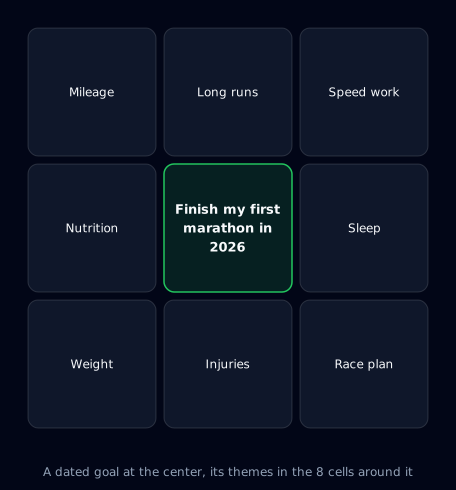
The eight cells around the center answer "what does this goal actually depend on?" — at the level of themes, not tasks. Don't force exactly eight up front. Brainstorm whatever comes (five is fine, so is twelve), then cut down to eight using these filters:
- Favor direct levers. For a marathon, mileage is direct; motivation is downstream of it.
- Merge overlaps. "Nutrition" and "diet" are one theme.
- Stay inside your control. Weather and your manager's opinion don't get a cell.
- Mix the categories. Skill, body, habits, environment, people, mindset — different kinds of levers, not eight flavors of the same one.
If you come up short, run through eight standard axes — body, skill, habits, environment, people, mindset, money, time — and check which ones your goal touches. If some still stay empty, six or seven themes is fine. Move on.
Step 3: Break each theme into eight actions
Copy each of the eight themes into the center of its own surrounding 3x3 block. The eight cells around it hold the concrete behaviors that move that theme forward.
Write action cells like this:
- Start with a verb. Run, read, send, measure. No "-ness," no "become."
- Include an amount or a frequency. Three times a week. Ten minutes every morning. Two books a month.
- Keep it small enough to start this week. "Run a marathon" is the goal, not an action. "Do a 20 km long run this week" is an action.
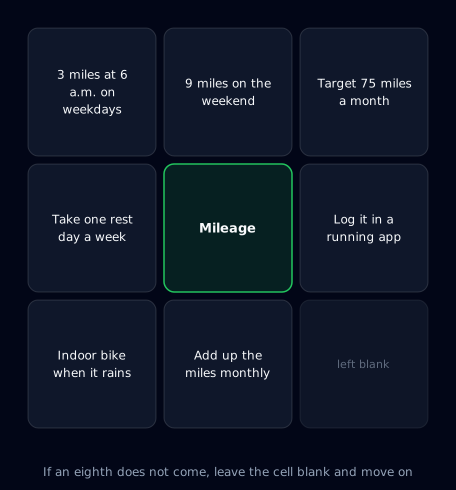
Here's the "mileage" theme broken down:
| Action cell | Content |
|---|---|
| 1 | Hold roughly 120 km (about 75 miles) a month |
| 2 | Fixed weekday slot: 5 km at 6 a.m. |
| 3 | One long run (15–20 km) on Saturday or Sunday |
| 4 | Log every run in the tracking app the same day |
| 5 | Review monthly mileage and set next month's target |
| 6 | Switch to the gym treadmill on rain days |
| 7 | Keep two non-running days a week |
| 8 | (blank) |
If the eighth doesn't come, leave it open for whatever you learn in month two. Sixty-four is the ceiling, not a quota — 40 to 50 actions is plenty to run a year on.
Step 4: Move the actions into months, weeks, and days
This is the step that separates a chart you finished from a chart you use. The 64 action cells are a mixed bag, so sort them first:
- Habits (recurring): "5 km on weekday mornings," "two rest days a week." These become fixed calendar slots.
- One-off tasks with a deadline: "replace my shoes," "register for the race." Give each a due date and put it on the task list.
- Monthly milestones (things that accumulate): "120 km this month," "review at month end." These become the month's target, then get split across weeks.
Then lay the whole thing out in four layers:
| Layer | What goes in it | Where it comes from in the chart |
|---|---|---|
| Year | The center goal | The center cell |
| Month | One milestone for this month | The "accumulating" action cells |
| Week | Up to eight weekly goals per month | Action cells across all eight themes that serve the month |
| Day | One to three things for today | Whatever sits under this week's goal |
Pick one goal for the month — something like "120 km of base mileage." It's a milestone on the way to the yearly goal, not one of the eight themes lifted wholesale.
Then split that month into up to eight weekly goals. A month is four or five weeks, so that's one or two per week: "week 1, a 20 km long run," "week 2, three easy runs," and so on, each already assigned to a week. They can come from any theme — "5 km on weekday mornings" from mileage and "two rest days a week" from injury prevention can share the same month. The 64 action cells work as a candidate list you draw from every time a new month starts.
Each day, put one to three things under the current week's goal. Once a week, look back at what happened and rebalance the rest of the month.
If you're running this on paper or in a spreadsheet, keep a separate sheet for "this month's eight weekly goals" and copy them over at the start of each month.
Try a working mandala chart in your browser (no signup)
Step 4 is hard to picture on paper, so there's a live version on the Abstria landing page. It's pre-loaded with the marathon example: the year, month, week, and day layers, plus a mandala where the center is this month's goal and the eight surrounding cells are that month's weekly goals. Check off a task for today and watch it roll up into the week, month, and year — about 30 seconds, no account needed.
See a mandala chart in motion (no signup)
Turning the chart into a system
Paper and spreadsheets get you through step 3 fine. They run out of room after that:
- Choosing this month's eight weekly goals from 64 actions means rewriting from scratch every month.
- Nothing you actually did ever makes it back onto the chart.
Abstria is a goal app built around step 4. Bring the "mileage" block from step 3 over and the mapping looks like this:
- The yearly goal (YAP) holds "Finish my first marathon in 2026." That's the center cell of the whole screen.
- Twelve monthly blocks (MAP) sit around it at once. "120 km base mileage" goes in the center of this month's block.
- Open one block and its 3x3 expands: this month's goal in the center, surrounded by eight weekly goals (WAP) — week 1 the 20 km long run, week 2 three easy runs, week 3 a build-up run. You pick them from your step 3 action cells and spread them across the month. Eight is the cap per month, matching the eight cells around a mandala center.
- Open a weekly goal and you can put today's tasks (DAP) under it. Under "20 km long run," today's share might be "30-minute easy run this morning."
The cell counts look alike, but a paper chart and the app screen hold different things. The 81 cells on paper are a decomposition map of a single year, with no notion of time. The Abstria screen is an execution plan where twelve months sit side by side and each block is one month's weekly goals.
So keep the paper chart as your map, and use it to pick the eight weekly goals that go into this month's block. Opening the demo next to your own grid makes that choice noticeably easier.
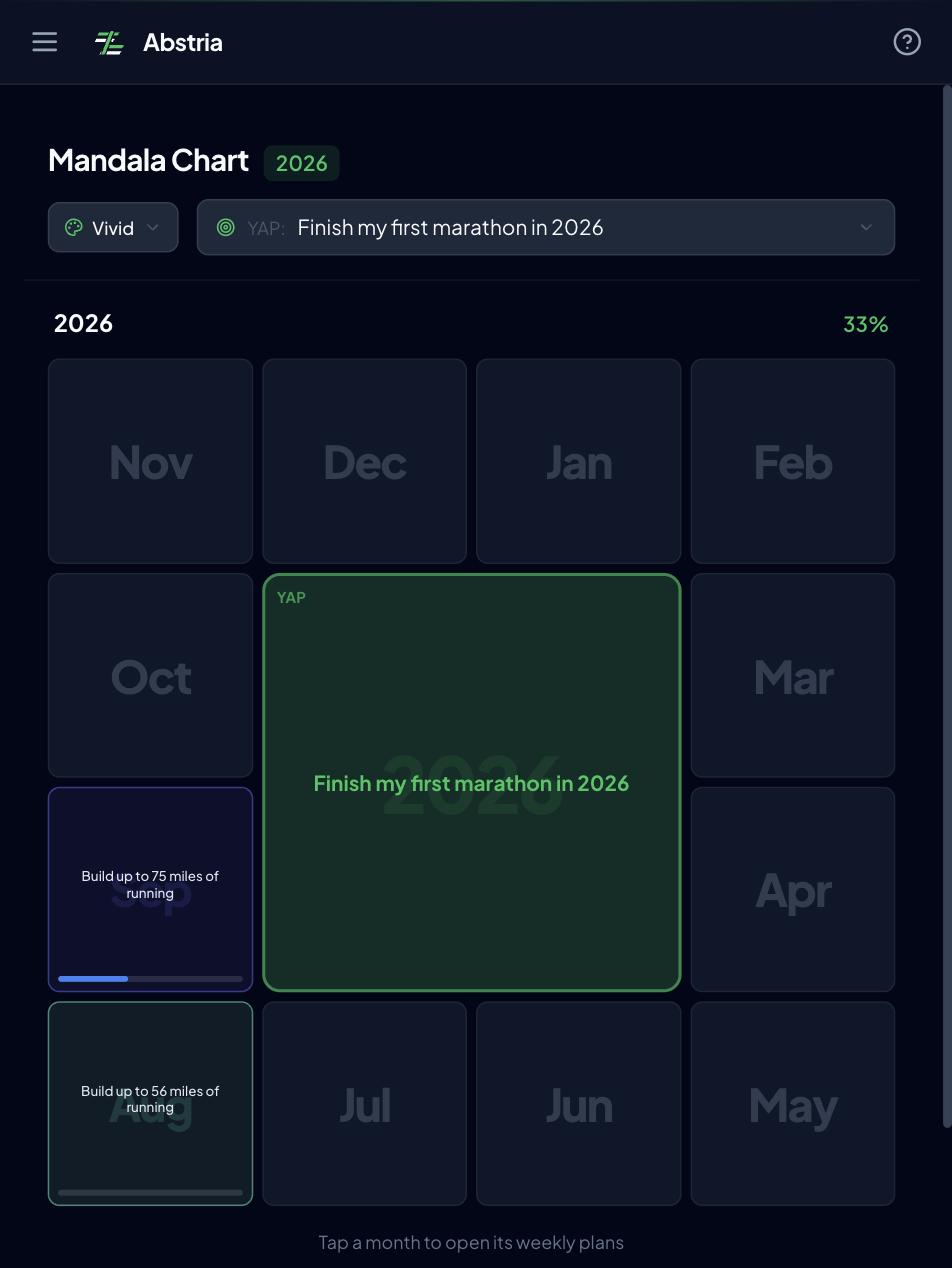
Tasks you complete inside the cells roll up into weekly and monthly progress, so "did I actually do it" finds its way back to the chart.
The Free plan covers up to 3 yearly goals and 100 active items (as of September 2026). The example in this article — one yearly goal, one monthly goal, eight weekly goals, a handful of daily tasks — fits comfortably inside that, and the mandala view and all four layers are fully available on Free. See the pricing page for details.
Abstria isn't the only tool that can hold a mandala chart. Some lean toward freehand drawing, some behave like an Excel template, some are built for sharing with a team, and the right pick depends on what you need it for — mandala chart apps compared weighs them side by side.
FAQ
Q. How many cells does a mandala chart need?
Eighty-one (9x9) is the standard for goal setting, but the center nine (3x3) works on its own to start. Once the center goal and eight themes are set, you can add the action blocks later — starting at nine cells and expanding theme by theme is the version people actually finish.
Q. What if I can't fill all eight cells?
Leave them blank and keep going. Cells you forced yourself to fill don't get done anyway, so stopping at six or seven and starting execution gets better results. If you want more, run your goal against the eight axes from step 2: body, skill, habits, environment, people, mindset, money, time.
Q. Is handwriting or an app better?
Handwrite the chart, run it in an app. Getting the center goal and eight themes out is easier on paper, where you can sprawl. Rebuilding this month's weekly goals from 64 actions and feeding results back is what paper can't keep up with.
Q. What time horizon should the center goal have?
One year is the easiest to build and the easiest to run. Anything over three years produces abstract themes, and the action cells drift back into "states." If you have a long-range goal, write what you'll achieve toward it this year in the center and rebuild the chart annually.
Q. What if I have several goals?
One chart per center goal, and no more than two charts running at once. With two centers on one chart, it stops being clear which goal a theme belongs to. For genuinely separate areas — work and fitness, say — make separate charts, then put them on one calendar at the monthly and weekly stage to check they aren't fighting for the same hours.
You can watch step 4 — months, weeks, and days — work in your browser right now. No signup.
See a mandala chart in motion (free, no signup)
If you want to run your own goal across the year, month, week, and day layers, request access. Abstria is invite-only for now and we're onboarding in batches. Already have an invite code? Start at create an account.