Draft (unpublished)
Weekly Review in 15 Minutes
How to run a weekly review in 15 minutes: three questions, a fixed weekly slot, and a way to turn the answers into next week's plan. Checklist included.
- weekly review
- goal setting
By the end of this article you'll have a weekly review you can start this week and still be running next month. The premise here: most weekly reviews die in the first two weeks not because you lack discipline, but because when, what, and where were never decided. Lock those three down and the review becomes a routine instead of a decision. Below is the setup, plus how to wire the results into next week's plan.
The weekly review formula: 15 minutes, 3 questions, a fixed day
Three things to decide up front:
- Time: 15 minutes. Don't stretch it. Keep only as many questions as fit in 15 minutes
- Content: 3 questions (covered in step 2)
- Timing: the same day and time every week. Put the recurring slot on your calendar before anything else can take it
Add one more — one place where the answers live — and there's nothing left to decide each week.
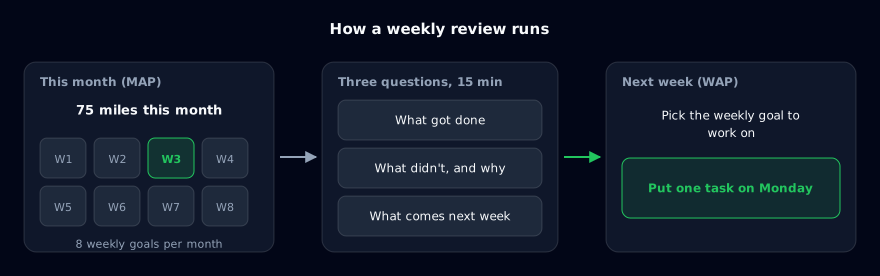
Those three answers are the raw material for next week's plan. If you think in layers — a yearly goal (YAP) broken into monthly goals (MAP), weekly goals (WAP), and daily tasks (DAP) — the weekly review is simply "check how this week's WAP went, then pick up next week's." Breaking a year down into days is its own topic, covered in how to set annual goals; this article stays at the weekly layer.
Why weekly reviews fall apart
"I'll do it when I have time"
A review loses every collision with urgent work. "Sometime this weekend" or "once things calm down" is not a time slot. Without a day and an hour attached, the plan quietly slides off the week.
There's too much to write
"Wins," "gratitude," "lessons learned," "improvements," "next week's goals" — every field you add makes a single session heavier, and heavier sessions get skipped. The week after a skip carries two weeks of backlog, which makes the next one heavier still.
The answers don't connect to anything
A review that ends on the page stops feeling useful. With no path from the answers to next week's calendar, the review becomes a journal, and journals stop when you get busy.
The three steps below are those failure modes, reversed.
Step 1: Fix the day and time for your weekly review
Start by putting a recurring "Weekly review, 15 min" block on your calendar.
Pick the day that matches where your week actually breaks:
| Option | Best for | Why |
|---|---|---|
| Friday afternoon (end of week) | People on a standard weekday schedule | Memory is fresh, and nothing carries into the weekend |
| Sunday evening or Monday morning | People who work weekends, or who plan on Monday | Review and planning happen in one continuous block |
For the hour, choose a slot other meetings rarely reach: 5:00 p.m. on Friday, when work is winding down, or before the workday starts on Monday, when nobody can interrupt. If you're undecided, start with Friday afternoon, run it twice, and move it if it doesn't fit.
Then decide the third item from the top of this article: where the answers live. A notebook, a text file, or a goal management app all work. The only requirement is that opening past entries takes less than ten seconds.
Step 2: Answer three questions — done, not done, next week
Inside the 15-minute block, answer these three in order.
Question 1: What did I finish this week?
List the daily tasks (DAPs) you actually completed. Skip adjectives like "decent" or "pretty good" and write finished actions: "Did a 20 km long run on Saturday," "Sent two proposals."
You're writing this list mainly to set up question 2.
Question 2: What didn't get done, and why?
One line per unfinished action, with a reason. Don't stop at "I was busy" — go exactly one level deeper:
- No time at all (something else pushed it out)
- Started but didn't finish (the estimate was too small)
- Never felt like starting (the purpose has faded, or the task is too coarse)
The type of reason decides next week's response. Pushed out: move it to a different day. Underestimated: cut it in half. Never started: drop it from the plan, or revisit why it's there at all.
If you mark items done or not done, don't allow a "partial" bucket. Something half-finished counts as not done, with the reason "stalled midway." A partial category is mostly a place to defer judgment.
Question 3: What am I doing next week?
Using questions 1 and 2, choose next week's daily tasks (DAPs) under next week's weekly goal (WAP). Keep the count small — one to three per day is the target. First pick which of this month's weekly goals you'll work on next week. Then, for each task you didn't finish, state explicitly whether you're re-adding it, splitting it, or dropping it.
Write each one down to when and what. Not "push harder on sales," but "Tuesday: send proposal emails to three prospects." Vague entries turn next week's question 2 into "I don't really know why."
Whatever time is left goes to the next step.
Step 3: Put one Monday task under next week's weekly goal
Once question 3 is written into your planning space, add one daily task under next week's weekly goal, scheduled for Monday. The point is to remove the "what do I start with?" moment on Monday morning. Decide it here and the review connects directly to next week's behavior.
Example: if the yearly goal is "finish my first marathon in 2026" and this month's goal is "build mileage to 120 km," next week's weekly goal might be "run 30 km" or "get one long run in," and the Monday task under it becomes "30-minute morning run." To spread a monthly goal across eight weekly goals, the 3x3 grid from how to make a mandala chart works well.
Habits that keep the weekly review alive
Once the system exists, here's where it usually erodes.
Read last week's answers before writing this week's
Spend the first minute rereading last week's three answers. Seeing "same reason, same task, second week running" changes which branch you pick in question 2. A one-off miss just needs a different day; a repeating reason means dropping the item or rethinking its purpose. That reread is exactly why step 1 insists on a single location.
If you skip a week, write one line saying so
Travel and illness will take out a week. When that happens, don't try to review two weeks carefully — write "skipped last week" and answer only for the current week.
Be willing to shrink "next week"
An item that shows up under question 2 week after week is a candidate for deletion, or for a hard look at its purpose. Rolling the same item forward every week is a sign the review isn't doing its job.
Once a month, look one layer up
A weekly review only looks at weekly goals and daily tasks. In the last (or first) weekly review of the month, add five minutes to ask whether this month's goal (MAP) is actually moving the yearly goal (YAP). If you're freelance, this is also the moment to compare the month's revenue against the actions that produced it (freelance goal setting covers that in detail).
The three questions, ready to copy
Paste this wherever your review lives. Fill in the week range and review date first, then answer.
Weekly review (week of: / reviewed on: )
* Before writing, reread last week's answers
1. Finished this week:
2. Not finished / why (no time - didn't finish - never started):
3. Next week (1-3 tasks per day) / first Monday task:
Running the weekly review in an app (how it works in Abstria)
Paper and notes apps work fine for this. But the longer you keep it up, the more time goes into re-collecting "what of this week's tasks is done and what isn't," and into moving unfinished items into next week.
As noted in the third failure mode, a review whose answers go nowhere turns into a journal. When year, month, week, and day are held as one hierarchy, marking today's task complete automatically shows up as progress on the week, the month, and the year.
Abstria is a goal management app built on that hierarchy: yearly goals (YAP), monthly goals (MAP), weekly goals (WAP), and daily tasks (DAP). The "path from answers to next week's plan" is the structure itself.
The fastest way to see it is to try it. The demo on the homepage is preloaded with a marathon-training example — a year, month, week, and day goal plus eight weekly goals — and one click to complete a daily task ripples up through the week, month, and year. No signup, no data entry. See it in action
Here's how each part of the review maps to the product.
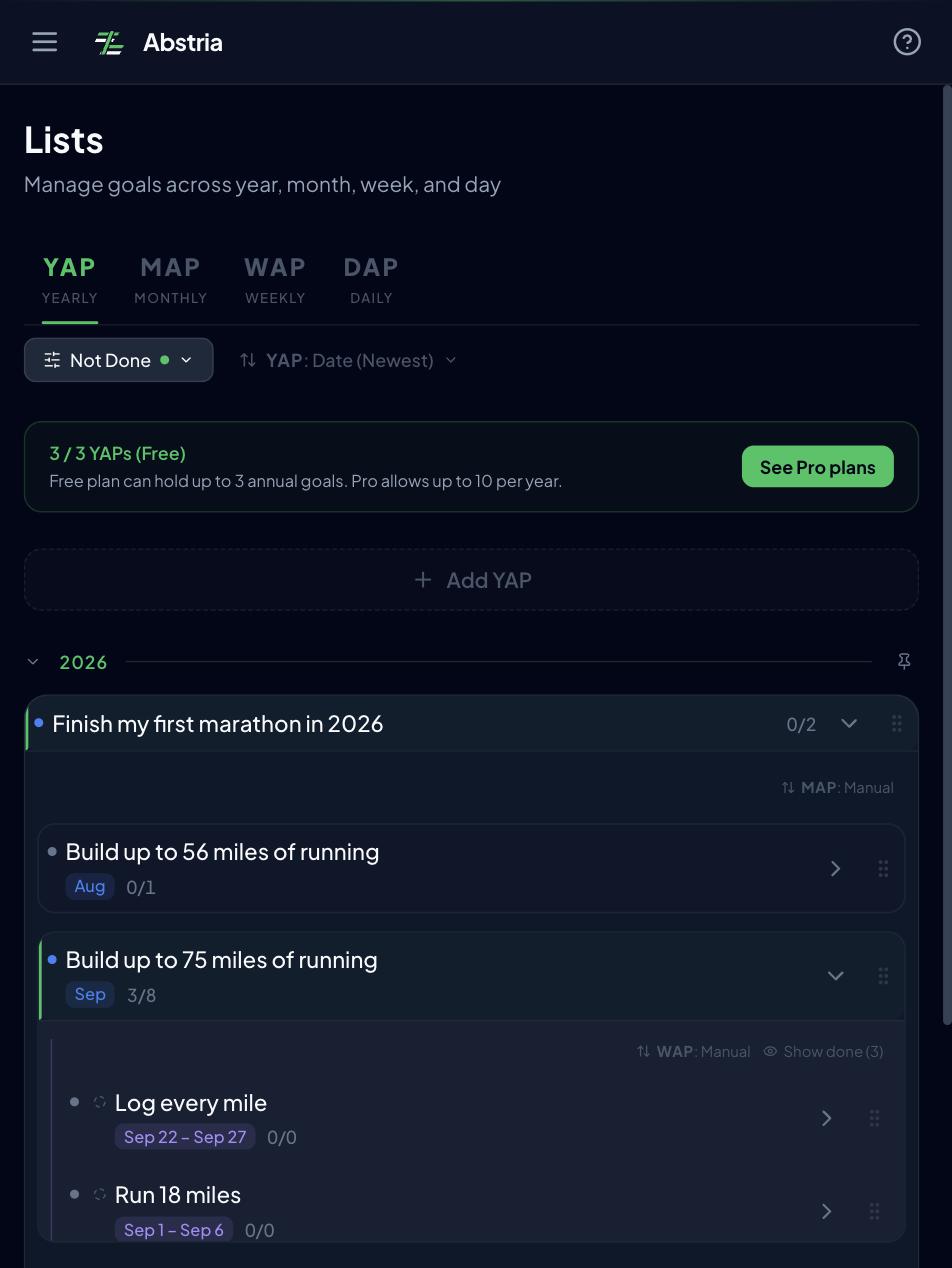
Questions 1 and 2: read the week (WAP) tab
Open this week's WAP in the weekly tab of the Lists screen and the daily tasks under it appear with their completion state. Questions 1 and 2 are answered by reading that list top to bottom. There's nothing to re-collect, so the first half of the 15 minutes is pure reading.
Question 3: see the whole month on the mandala
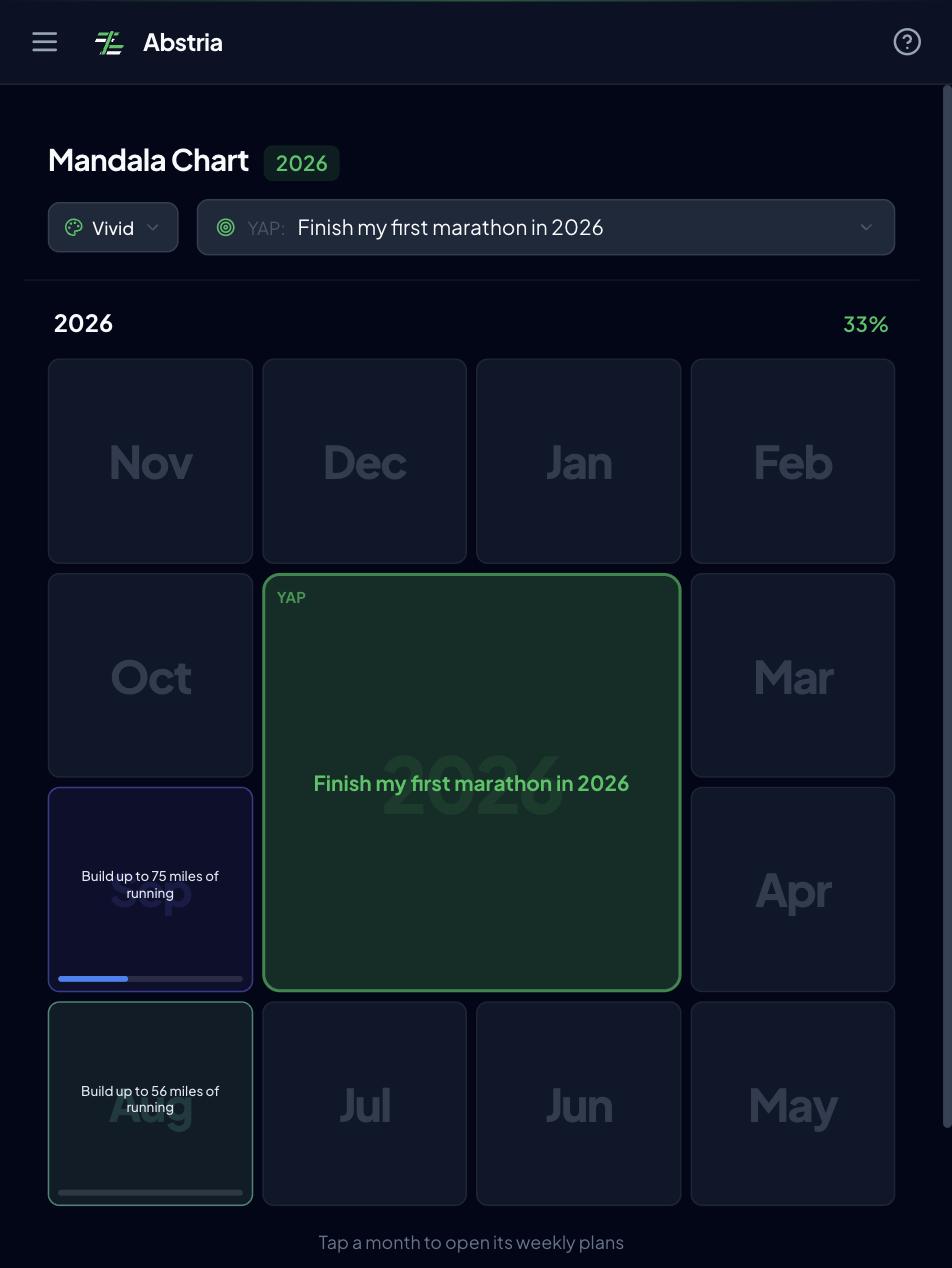
This month's weekly goals are visible at a glance on the Mandala screen. Each monthly goal sits at the center of a 3x3 block, and the eight surrounding cells are that month's weekly goals. A single monthly goal holds at most eight weekly goals for the entire month, so if you fill those eight cells at the start of the month and assign them to weeks, the review is just picking which one you'll work on next. Because question 3 no longer means rewriting weekly goals, the second half of the 15 minutes shrinks too.
Carrying items over: "change WAP" and the Review screen
For any task you decided to re-add in question 2, use "change WAP" on the task in the Lists screen to reattach it to next week's weekly goal. That's the entire carry-over. Nothing gets retyped, so rollovers cost almost no time.
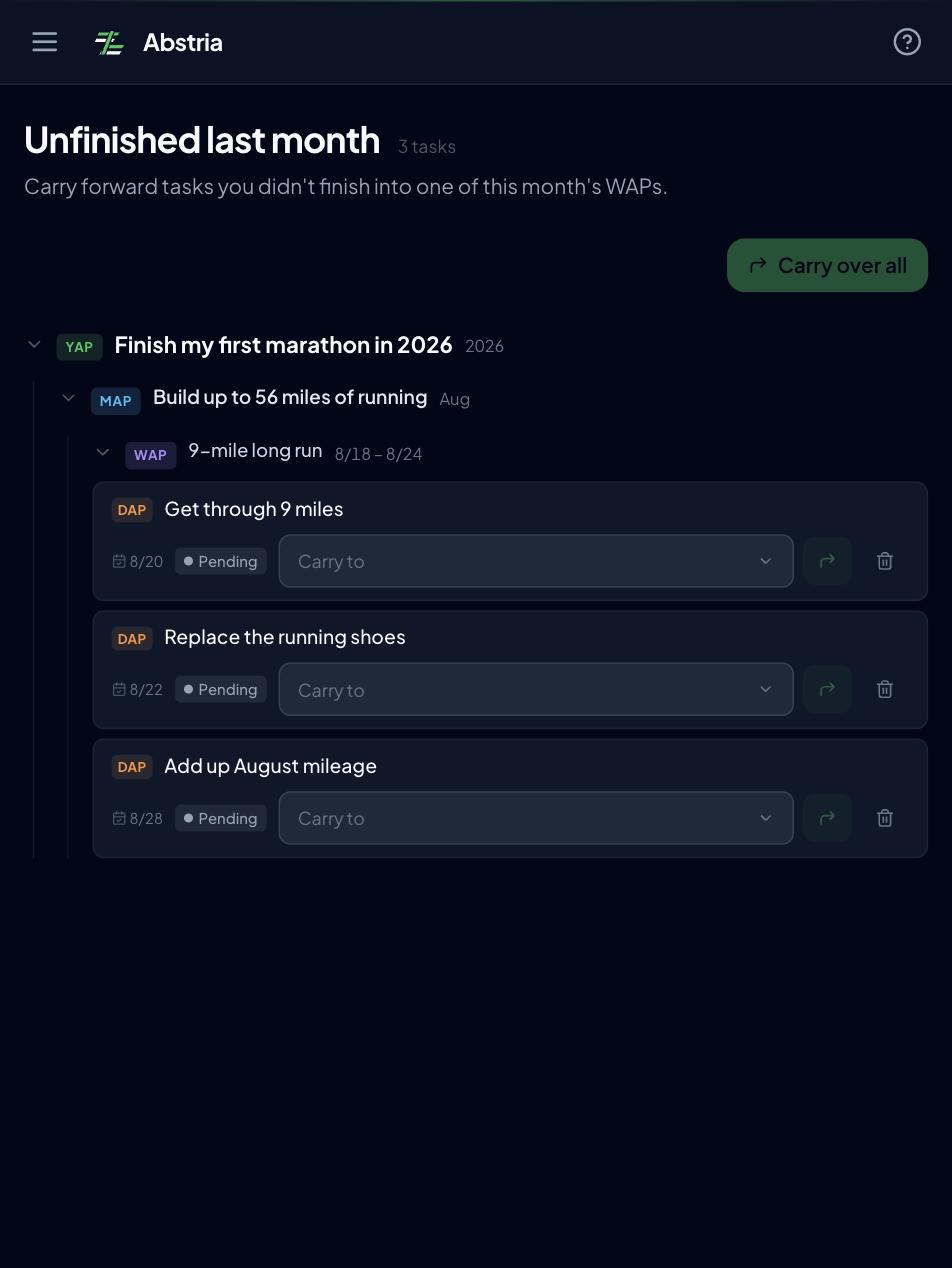
For items left over across months, the Review screen lists them as "last month's unfinished work," grouped by their original yearly, monthly, and weekly goal. The heading says last month, but the scope is everything before the current month, so older leftovers surface too. For each row you either pick a destination among this month's weekly goals under the same yearly goal and carry it over, or delete it on the spot — so even the end-of-month review doesn't spend time recounting leftovers.
FAQ
Q. What day should I do my weekly review?
Let the number of cancellations decide. If other commitments kill it two weeks in a row, the day or time is wrong and you should move it. While it's still happening, leave it alone even if it feels slightly awkward.
Q. Can I add more questions?
Add them only after 15 minutes runs smoothly. Every extra field raises the cost of a single session and makes skipped weeks more likely.
Q. Do I need a daily review as well as a weekly one?
Starting with the weekly review alone is fine. One workable approach is to keep the daily layer to nothing more than marking today's tasks complete. If completion state is recorded as you go, questions 1 and 2 are answered just by reading it.
Q. I can't tell which "reason it didn't get done" applies.
When in doubt, choose "never started." That pushes you toward rethinking the plan rather than settling for a scheduling tweak.
Q. What if there's nothing to review this week?
Answer only question 3. A week with no actions to review means last week had no plan, or had one that never got specific. Write a single daily task that includes when and what, and the review starts working the following week.
You can try the three questions on top of a year-month-week-day hierarchy without creating an account.
See it in action — complete a daily task and watch it roll up through the week, month, and year.
If you want to keep using it: as of September 2026 Abstria is invite-only, so request access. The Free plan covers 3 yearly goals (YAP) and up to 100 active items at no cost (as of September 2026).
<!-- TODO(release): once invite-only ends, drop "as of September 2026 Abstria is invite-only, so [request access](/invite)" from the closing paragraph and rewrite it as "If you want to keep using it, [sign up](/signup) and start." Keep the Free plan sentence (3 yearly goals, 100 active items) as is. - Trigger: the /signup invite gate in apps/web/middleware.ts (unauthenticated requests without the `referral_pending` cookie are redirected to /invite) is removed - As of 2026-09-23 the gate is still in place at apps/web/middleware.ts:93, so invite-only is accurate and the current CTA is correct - Fix the matching sentence in ja.md at the same time ("2026 年 9 月時点では招待制のため、[/invite](/invite) からアクセスをリクエストしてください。") - If the change lands after September 2026, update both "as of September 2026" date stamps (invite-only and Free plan) -->